快速开始
在本指南中,我们将介绍在 SQL 数据库上创建问答链和代理的基本方法。这些系统允许我们就 SQL 数据库中的数据提问,并获得自然语言形式的答案。两者之间的主要区别在于,我们的代理可以根据需要多次循环查询数据库来回答问题。
⚠️ 安全提示 ⚠️
构建 SQL 数据库的问答系统需要执行模型生成的 SQL 查询。这样做存在固有风险。请确保你的数据库连接权限始终根据链/代理的需求尽可能缩小范围。这将减轻(尽管不能消除)构建模型驱动系统的风险。有关一般安全最佳实践的更多信息,参见此处。
架构
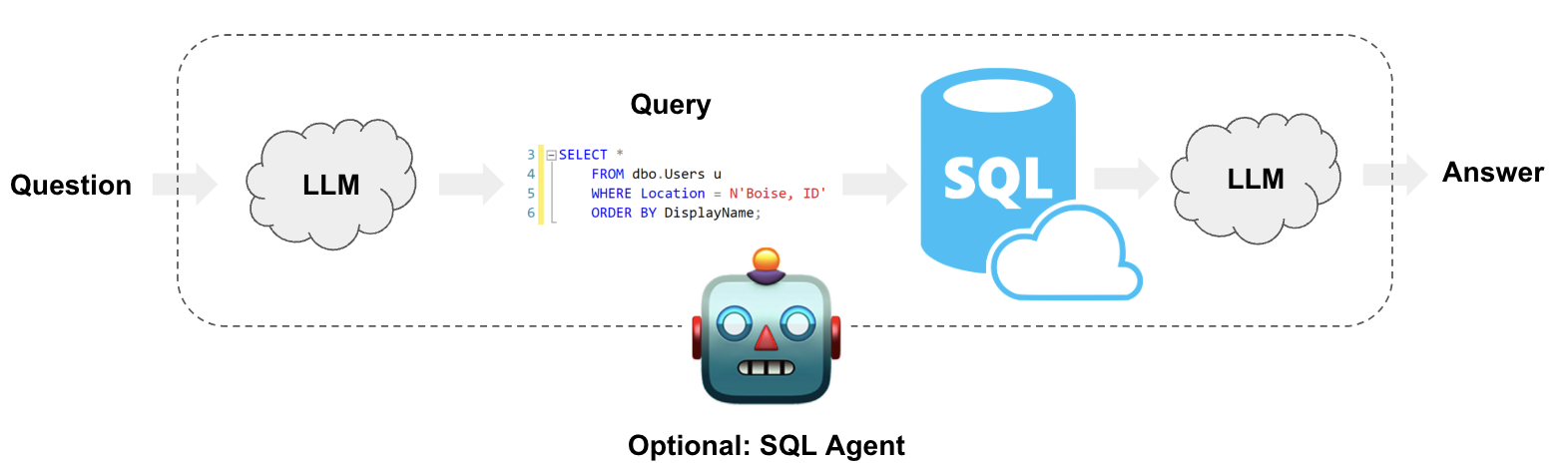
从高层次看,任何 SQL 链和代理的步骤如下:
- 将问题转换为 SQL 查询:模型将用户输入转换为 SQL 查询。
- 执行 SQL 查询:执行 SQL 查询。
- 回答问题:模型使用查询结果回应用户输入。
设置
首先,获取所需的包并设置环境变量:
%pip install --upgrade --quiet langchain langchain-community langchain-openai本指南中我们将使用 OpenAI 模型。
import getpass
import os

os.environ["OPENAI_API_KEY"] = getpass.getpass()

# Uncomment the below to use LangSmith. Not required.
# os.environ ["LANGCHAIN_API_KEY"] = getpass.getpass()
# os.environ ["LANGCHAIN_TRACING_V2"] = "true"
下面的示例将使用 Chinook 数据库的 SQLite 连接。请按照 这些安装步骤 (opens in a new tab) 在与本笔记本相同的目录中创建 Chinook.db:
- 将 此文件 (opens in a new tab) 保存为
Chinook_Sqlite.sql - 运行
sqlite3 Chinook.db - 运行
.read Chinook_Sqlite.sql - 测试
SELECT * FROM Artist LIMIT 10;
现在,Chinhook.db 就在我们的目录中,我们可以使用由 SQLAlchemy 驱动的 SQLDatabase 类与它交互:
from langchain_community.utilities import SQLDatabase

db = SQLDatabase.from_uri("sqlite:///Chinook.db")
print(db.dialect)
print(db.get_usable_table_names())
db.run("SELECT * FROM Artist LIMIT 10;")
sqlite
['Album', 'Artist', 'Customer', 'Employee', 'Genre', 'Invoice', 'InvoiceLine', 'MediaType', 'Playlist', 'PlaylistTrack', 'Track']"[(1, 'AC/DC'), (2, 'Accept'), (3, 'Aerosmith'), (4, 'Alanis Morissette'), (5, 'Alice In Chains'), (6, 'Antônio Carlos Jobim'), (7, 'Apocalyptica'), (8, 'Audioslave'), (9, 'BackBeat'), (10, 'Billy Cobham')]"很好!我们现在有了一个可以查询的 SQL 数据库。现在让我们尝试将它接入 LLM。
链
让我们创建一个简单的链,它接收一个问题,将其转换为 SQL 查询,执行该查询,并使用结果回答原始问题。
将问题转换为 SQL 查询
SQL 链或代理的第一步是接收用户输入并将其转换为 SQL 查询。LangChain 为此内置了一个链:create_sql_query_chain (opens in a new tab)。
from langchain.chains import create_sql_query_chain
from langchain_openai import ChatOpenAI

llm = ChatOpenAI(model="gpt-3.5-turbo", temperature=0)
chain = create_sql_query_chain(llm, db)
response = chain.invoke({"question": "How many employees are there"})
response
'SELECT COUNT(*) FROM Employee'我们可以执行该查询以确保它有效:
db.run(response)'[(8,)]'我们可以查看 LangSmith 追踪 (opens in a new tab) 来更好地理解这个链在做什么。我们也可以直接检查链的提示。查看下面的提示,我们可以看到它:
- 特定于方言。在本例中它显式引用了 SQLite。
- 包含所有可用表的定义。
- 每个表有三行示例数据。
这种技术受到诸如 这篇 (opens in a new tab) 论文的启发,该论文建议展示示例行并明确列出表可以提高性能。我们也可以像这样检查完整的提示:
chain.get_prompts()[0].pretty_print()You are a SQLite expert. Given an input question, first create a syntactically correct SQLite query to run, then look at the results of the query and return the answer to the input question.
Unless the user specifies in the question a specific number of examples to obtain, query for at most 5 results using the LIMIT clause as per SQLite. You can order the results to return the most informative data in the database.
Never query for all columns from a table. You must query only the columns that are needed to answer the question. Wrap each column name in double quotes (") to denote them as delimited identifiers.
Pay attention to use only the column names you can see in the tables below. Be careful to not query for columns that do not exist. Also, pay attention to which column is in which table.
Pay attention to use date('now') function to get the current date, if the question involves "today".
Use the following format:
Question: Question here
SQLQuery: SQL Query to run
SQLResult: Result of the SQLQuery
Answer: Final answer here
Only use the following tables:
[33;1m[1;3m{table_info}[0m
Question: [33;1m[1;3m{input}[0m执行 SQL 查询
现在我们已经生成了一个 SQL 查询,我们想要执行它。这是创建 SQL 链最危险的部分。 请仔细考虑对你的数据运行自动化查询是否合适。尽可能减少数据库连接权限。考虑在查询执行前为你的链添加人工审批步骤(见下文)。
我们可以使用 QuerySQLDatabaseTool 轻松地将查询执行添加到我们的链中:
from langchain_community.tools.sql_database.tool import QuerySQLDataBaseTool

execute_query = QuerySQLDataBaseTool(db=db)
write_query = create_sql_query_chain(llm, db)
chain = write_query | execute_query
chain.invoke({"question": "How many employees are there"})'[(8,)]'回答问题
现在我们已经有了一种自动生成和执行查询的方式,我们只需要将原始问题和 SQL 查询结果结合起来以生成最终答案。我们可以通过再次将问题和结果传递给 LLM 来做到这一点:
from operator import itemgetter

from langchain_core.output_parsers import StrOutputParser
from langchain_core.prompts import PromptTemplate
from langchain_core.runnables import RunnablePassthrough

answer_prompt = PromptTemplate.from_template(
    """Given the following user question, corresponding SQL query, and SQL result, answer the user question.

Question: {question}
SQL Query: {query}
SQL Result: {result}
Answer: """
)

answer = answer_prompt | llm | StrOutputParser()
chain = (
    RunnablePassthrough.assign(query=write_query).assign(
        result=itemgetter("query") | execute_query
    )
    | answer
)

chain.invoke({"question": "How many employees are there"})
'There are 8 employees.'下一步
对于更复杂的查询生成,我们可能想要创建少样本提示或添加查询检查步骤。对于这类高级技巧以及更多内容,请查看:
代理
LangChain 有一个 SQL 代理,它提供了一种更灵活的与 SQL 数据库交互的方式。使用 SQL 代理的主要优势是:
- 它可以根据数据库的模式以及数据库的内容(例如描述某个特定表)来回答问题。
- 它可以通过运行生成的查询、捕获回溯并正确地重新生成来从错误中恢复。
- 它可以回答需要多个依赖查询的问题。
- 它只考虑相关表的模式,从而节省 token。
要初始化代理,我们使用 create_sql_agent 函数。该代理包含 SQLDatabaseToolkit,其中包含以下工具:
- 创建和执行查询
- 检查查询语法
- 检索表描述
- ... 以及更多
初始化代理
from langchain_community.agent_toolkits import create_sql_agent

agent_executor = create_sql_agent(llm, db=db, agent_type="openai-tools", verbose=True)agent_executor.invoke(
{
"input": "List the total sales per country. Which country's customers spent the most?"
}
)
[1m> Entering new AgentExecutor chain...[0m
[32;1m[1;3m
Invoking: `sql_db_list_tables` with `{}`


[0m[38;5;200m[1;3mAlbum, Artist, Customer, Employee, Genre, Invoice, InvoiceLine, MediaType, Playlist, PlaylistTrack, Track[0m[32;1m[1;3m
Invoking: `sql_db_schema` with `Invoice,Customer`


[0m[33;1m[1;3m
CREATE TABLE "Customer" (
	"CustomerId" INTEGER NOT NULL,
	"FirstName" NVARCHAR(40) NOT NULL,
	"LastName" NVARCHAR(20) NOT NULL,
	"Company" NVARCHAR(80),
	"Address" NVARCHAR(70),
	"City" NVARCHAR(40),
	"State" NVARCHAR(40),
	"Country" NVARCHAR(40),
	"PostalCode" NVARCHAR(10),
	"Phone" NVARCHAR(24),
	"Fax" NVARCHAR(24),
	"Email" NVARCHAR(60) NOT NULL,
	"SupportRepId" INTEGER,
	PRIMARY KEY ("CustomerId"),
	FOREIGN KEY("SupportRepId") REFERENCES "Employee" ("EmployeeId")
)

/*
3 rows from Customer table:
CustomerId	FirstName	LastName	Company	Address	City	State	Country	PostalCode	Phone	Fax	Email	SupportRepId
1	Luís	Gonçalves	Embraer - Empresa Brasileira de Aeronáutica S.A.	Av. Brigadeiro Faria Lima, 2170	São José dos Campos	SP	Brazil	12227-000	+55 (12) 3923-5555	+55 (12) 3923-5566	[email protected]	3
2	Leonie	Köhler	None	Theodor-Heuss-Straße 34	Stuttgart	None	Germany	70174	+49 0711 2842222	None	[email protected]	5
3	François	Tremblay	None	1498 rue Bélanger	Montréal	QC	Canada	H2G 1A7	+1 (514) 721-4711	None	[email protected]	3
*/


CREATE TABLE "Invoice" (
	"InvoiceId" INTEGER NOT NULL,
	"CustomerId" INTEGER NOT NULL,
	"InvoiceDate" DATETIME NOT NULL,
	"BillingAddress" NVARCHAR(70),
	"BillingCity" NVARCHAR(40),
	"BillingState" NVARCHAR(40),
	"BillingCountry" NVARCHAR(40),
	"BillingPostalCode" NVARCHAR(10),
	"Total" NUMERIC(10, 2) NOT NULL,
	PRIMARY KEY ("InvoiceId"),
	FOREIGN KEY("CustomerId") REFERENCES "Customer" ("CustomerId")
)

/*
3 rows from Invoice table:
InvoiceId	CustomerId	InvoiceDate	BillingAddress	BillingCity	BillingState	BillingCountry	BillingPostalCode	Total
1	2	2009-01-01 00:00:00	Theodor-Heuss-Straße 34	Stuttgart	None	Germany	70174	1.98
2	4	2009-01-02 00:00:00	Ullevålsveien 14	Oslo	None	Norway	0171	3.96
3	8	2009-01-03 00:00:00	Grétrystraat 63	Brussels	None	Belgium	1000	5.94
*/[0m[32;1m[1;3m
Invoking: `sql_db_query` with `SELECT c.Country, SUM(i.Total) AS TotalSales FROM Invoice i JOIN Customer c ON i.CustomerId = c.CustomerId GROUP BY c.Country ORDER BY TotalSales DESC LIMIT 10;`
responded: To list the total sales per country, I can query the "Invoice" and "Customer" tables. I will join these tables on the "CustomerId" column and group the results by the "BillingCountry" column. Then, I will calculate the sum of the "Total" column to get the total sales per country. Finally, I will order the results in descending order of the total sales.

Here is the SQL query:

``` sql
SELECT c.Country, SUM(i.Total) AS TotalSales
FROM Invoice i
JOIN Customer c ON i.CustomerId = c.CustomerId
GROUP BY c.Country
ORDER BY TotalSales DESC
LIMIT 10;
```

Now, I will execute this query to get the total sales per country.

[0m[36;1m[1;3m[('USA', 523.0600000000003), ('Canada', 303.9599999999999), ('France', 195.09999999999994), ('Brazil', 190.09999999999997), ('Germany', 156.48), ('United Kingdom', 112.85999999999999), ('Czech Republic', 90.24000000000001), ('Portugal', 77.23999999999998), ('India', 75.25999999999999), ('Chile', 46.62)][0m[32;1m[1;3mThe total sales per country are as follows:

1. USA: $523.06
2. Canada: $303.96
3. France: $195.10
4. Brazil: $190.10
5. Germany: $156.48
6. United Kingdom: $112.86
7. Czech Republic: $90.24
8. Portugal: $77.24
9. India: $75.26
10. Chile: $46.62

To answer the second question, the country whose customers spent the most is the USA, with a total sales of $523.06.[0m

[1m> Finished chain.[0m
{'input': "List the total sales per country. Which country's customers spent the most?",
'output': 'The total sales per country are as follows:\n\n1. USA: $523.06\n2. Canada: $303.96\n3. France: $195.10\n4. Brazil: $190.10\n5. Germany: $156.48\n6. United Kingdom: $112.86\n7. Czech Republic: $90.24\n8. Portugal: $77.24\n9. India: $75.26\n10. Chile: $46.62\n\nTo answer the second question, the country whose customers spent the most is the USA, with a total sales of $523.06.'}agent_executor.invoke({"input": "Describe the playlisttrack table"})
[1m> Entering new AgentExecutor chain...[0m
[32;1m[1;3m
Invoking: `sql_db_list_tables` with `{}`


[0m[38;5;200m[1;3mAlbum, Artist, Customer, Employee, Genre, Invoice, InvoiceLine, MediaType, Playlist, PlaylistTrack, Track[0m[32;1m[1;3m
Invoking: `sql_db_schema` with `PlaylistTrack`


[0m[33;1m[1;3m
CREATE TABLE "PlaylistTrack" (
	"PlaylistId" INTEGER NOT NULL,
	"TrackId" INTEGER NOT NULL,
	PRIMARY KEY ("PlaylistId", "TrackId"),
	FOREIGN KEY("TrackId") REFERENCES "Track" ("TrackId"),
	FOREIGN KEY("PlaylistId") REFERENCES "Playlist" ("PlaylistId")
)

/*
3 rows from PlaylistTrack table:
PlaylistId	TrackId
1	3402
1	3389
1	3390
*/[0m[32;1m[1;3mThe `PlaylistTrack` table has two columns: `PlaylistId` and `TrackId`. It is a junction table that represents the many-to-many relationship between playlists and tracks.

Here is the schema of the `PlaylistTrack` table:

```
CREATE TABLE "PlaylistTrack" (
	"PlaylistId" INTEGER NOT NULL,
	"TrackId" INTEGER NOT NULL,
	PRIMARY KEY ("PlaylistId", "TrackId"),
	FOREIGN KEY("TrackId") REFERENCES "Track" ("TrackId"),
	FOREIGN KEY("PlaylistId") REFERENCES "Playlist" ("PlaylistId")
)
```

The `PlaylistId` column is a foreign key referencing the `PlaylistId` column in the `Playlist` table. The `TrackId` column is a foreign key referencing the `TrackId` column in the `Track` table.

Here are three sample rows from the `PlaylistTrack` table:

```
PlaylistId   TrackId
1            3402
1            3389
1            3390
```

Please let me know if there is anything else I can help with.[0m

[1m> Finished chain.[0m
{'input': 'Describe the playlisttrack table',
 'output': 'The `PlaylistTrack` table has two columns: `PlaylistId` and `TrackId`. It is a junction table that represents the many-to-many relationship between playlists and tracks. \n\nHere is the schema of the `PlaylistTrack` table:\n\n```\nCREATE TABLE "PlaylistTrack" (\n\t "PlaylistId" INTEGER NOT NULL, \n\t "TrackId" INTEGER NOT NULL, \n\tPRIMARY KEY ("PlaylistId", "TrackId"), \n\tFOREIGN KEY("TrackId") REFERENCES "Track" ("TrackId"), \n\tFOREIGN KEY("PlaylistId") REFERENCES "Playlist" ("PlaylistId")\n)\n ```\n\nThe `PlaylistId` column is a foreign key referencing the `PlaylistId` column in the `Playlist` table. The `TrackId` column is a foreign key referencing the `TrackId` column in the `Track` table.\n\nHere are three sample rows from the `PlaylistTrack` table:\n\n```\nPlaylistId   TrackId\n1            3402\n1            3389\n1            3390\n```\n\nPlease let me know if there is anything else I can help with.'}
下一步
关于如何使用和自定义代理的更多内容,请前往代理页面。