Short-term memory
import ShortTermMemoryUsagePy from '/snippets/code-samples/short-term-memory-usage-py.mdx'; import ShortTermMemoryUsageJs from '/snippets/code-samples/short-term-memory-usage-js.mdx';
Overview
Memory is a system that remembers information about previous interactions. For AI agents, memory is crucial because it lets them remember previous interactions, learn from feedback, and adapt to user preferences. As agents tackle more complex tasks with numerous user interactions, this capability becomes essential for both efficiency and user satisfaction.
Short term memory lets your application remember previous interactions within a single thread or conversation.
A thread organizes multiple interactions in a session, similar to the way email groups messages in a single conversation.
Conversation history is the most common form of short-term memory. Long conversations pose a challenge to today's LLMs; a full history may not fit inside an LLM's context window, resulting in a context loss or errors.
Even if your model supports the full context length, most LLMs still perform poorly over long contexts. They get "distracted" by stale or off-topic content, all while suffering from slower response times and higher costs.
Chat models accept context using messages (opens in a new tab), which include instructions (a system message) and inputs (human messages). In chat applications, messages alternate between human inputs and model responses, resulting in a list of messages that grows longer over time. Because context windows are limited, many applications can benefit from using techniques to remove or "forget" stale information.
Need to remember information **across** conversations? Use [long-term memory](https://docs.langchain.com/oss/langchain/long-term-memory) to store and recall user-specific or application-level data across different threads and sessions.
Usage
To add short-term memory (thread-level persistence) to an agent, you need to specify a checkpointer when creating an agent.
LangChain's agent manages short-term memory as a part of your agent's state.

By storing these in the graph's state, the agent can access the full context for a given conversation while maintaining separation between different threads.

State is persisted to a database (or memory) using a checkpointer so the thread can be resumed at any time.

Short-term memory updates when the agent is invoked or a step (like a tool call) is completed, and the state is read at the start of each step.
In production
In production, use a checkpointer backed by a database:
pip install -U langgraph-checkpoint-postgres "psycopg[binary]"uv add langgraph-checkpoint-postgres "psycopg[binary]"By default,
langgraph-checkpoint-postgresinstallspsycopg(Psycopg 3) without extras. The install above addspsycopg[binary], which is recommended for most users. For other options, see the Psycopg installation docs (opens in a new tab).
from langchain.agents import create_agent
from langgraph.checkpoint.postgres import PostgresSaver  # [!code highlight]

def get_user_info() -> str:
    """Look up information about the current user."""
    return "No user profile on file."

DB_URI = "postgresql://postgres:postgres@localhost:5432/postgres?sslmode=disable"
with PostgresSaver.from_conn_string(DB_URI) as checkpointer:
    checkpointer.setup() # auto create tables in PostgreSQL
    agent = create_agent(
        "gpt-5.5",
        tools=[get_user_info],
        checkpointer=checkpointer,  # [!code highlight]
    )
For more checkpointer options including SQLite, Postgres, and Azure Cosmos DB, see the [list of checkpointer libraries](https://docs.langchain.com/oss/langgraph/checkpointers#checkpointer-libraries) in the Persistence documentation.
Customizing agent memory
By default, agents use @[AgentState] to manage short term memory, specifically the conversation history via a messages key.
You can extend @[AgentState] to add additional fields. Custom state schemas are passed to @[create_agent] using the @[state_schema] parameter.
from langchain.agents import create_agent, AgentState
from langgraph.checkpoint.memory import InMemorySaver


class CustomAgentState(AgentState):  # [!code highlight]
    user_id: str  # [!code highlight]
    preferences: dict  # [!code highlight]

agent = create_agent(
    "gpt-5.5",
    tools=[get_user_info],
    state_schema=CustomAgentState,  # [!code highlight]
    checkpointer=InMemorySaver(),
)

# Custom state can be passed in invoke
result = agent.invoke(
    {
        "messages": [{"role": "user", "content": "Hello"}],
        "user_id": "user_123",  # [!code highlight]
        "preferences": {"theme": "dark"}  # [!code highlight]
    },
    {"configurable": {"thread_id": "1"}})
Common patterns
With short-term memory enabled, long conversations can exceed the LLM's context window. Common solutions are:
- Trim messages:Remove first or last N messages (before calling LLM)
- Delete messages:Delete messages from LangGraph state permanently
- Summarize messages:Summarize earlier messages in the history and replace them with a summary
- Custom strategies:Custom strategies (e.g., message filtering, etc.)
This allows the agent to keep track of the conversation without exceeding the LLM's context window.
Trim messages
Most LLMs have a maximum supported context window (denominated in tokens).
One way to decide when to truncate messages is to count the tokens in the message history and truncate whenever it approaches that limit. If you're using LangChain, you can use the trim messages utility and specify the number of tokens to keep from the list, as well as the strategy (e.g., keep the last max_tokens) to use for handling the boundary.
To trim message history in an agent, use the @[@before_model] middleware decorator:
from langchain.messages import RemoveMessage
from langgraph.graph.message import REMOVE_ALL_MESSAGES
from langgraph.checkpoint.memory import InMemorySaver
from langchain.agents import create_agent, AgentState
from langchain.agents.middleware import before_model
from langgraph.runtime import Runtime
from langchain_core.runnables import RunnableConfig
from typing import Any


@before_model
def trim_messages(state: AgentState, runtime: Runtime) -> dict[str, Any] | None:
    """Keep only the last few messages to fit context window."""
    messages = state["messages"]

    if len(messages) <= 3:
        return None  # No changes needed

    first_msg = messages[0]
    recent_messages = messages[-3:] if len(messages) % 2 == 0 else messages[-4:]
    new_messages = [first_msg] + recent_messages

    return {
        "messages": [
            RemoveMessage(id=REMOVE_ALL_MESSAGES),
            *new_messages
        ]
    }

agent = create_agent(
    "gpt-5.5",
    tools=[...],
    middleware=[trim_messages],
    checkpointer=InMemorySaver(),
)

config: RunnableConfig = {"configurable": {"thread_id": "1"}}

agent.invoke({"messages": "hi, my name is bob"}, config)
agent.invoke({"messages": "write a short poem about cats"}, config)
agent.invoke({"messages": "now do the same but for dogs"}, config)
final_response = agent.invoke({"messages": "what's my name?"}, config)

final_response["messages"][-1].pretty_print()
"""
================================== Ai Message ==================================

Your name is Bob. You told me that earlier.
If you'd like me to call you a nickname or use a different name, just say the word.
"""
Delete messages
You can delete messages from the graph state to manage the message history.
This is useful when you want to remove specific messages or clear the entire message history.
To delete messages from the graph state, you can use the RemoveMessage.
For RemoveMessage to work, you need to use a state key with @[add_messages] reducer (opens in a new tab).
The default @[AgentState] provides this.
To remove specific messages:
from langchain.messages import RemoveMessage  # [!code highlight]

def delete_messages(state):
    messages = state["messages"]
    if len(messages) > 2:
        # remove the earliest two messages
        return {"messages": [RemoveMessage(id=m.id) for m in messages[:2]]}  # [!code highlight]
To remove all messages:
from langgraph.graph.message import REMOVE_ALL_MESSAGES  # [!code highlight]

def delete_messages(state):
    return {"messages": [RemoveMessage(id=REMOVE_ALL_MESSAGES)]}  # [!code highlight]
When deleting messages, **make sure** that the resulting message history is valid. Check the limitations of the LLM provider you're using. For example: * Some providers expect message history to start with a `user` message * Most providers require `assistant` messages with tool calls to be followed by corresponding `tool` result messages.
from langchain.messages import RemoveMessage
from langchain.agents import create_agent, AgentState
from langchain.agents.middleware import after_model
from langgraph.checkpoint.memory import InMemorySaver
from langgraph.runtime import Runtime
from langchain_core.runnables import RunnableConfig


@after_model
def delete_old_messages(state: AgentState, runtime: Runtime) -> dict | None:
    """Remove old messages to keep conversation manageable."""
    messages = state["messages"]
    if len(messages) > 2:
        # remove the earliest two messages
        return {"messages": [RemoveMessage(id=m.id) for m in messages[:2]]}
    return None


agent = create_agent(
    "gpt-5-nano",
    tools=[...],
    system_prompt="Please be concise and to the point.",
    middleware=[delete_old_messages],
    checkpointer=InMemorySaver(),
)

config: RunnableConfig = {"configurable": {"thread_id": "1"}}

stream = agent.stream_events(
    {"messages": [{"role": "user", "content": "hi! I'm bob"}]},
    config,
    version="v3",
)
for snapshot in stream.values:
    print([(message.type, message.content) for message in snapshot["messages"]])

stream = agent.stream_events(
    {"messages": [{"role": "user", "content": "write a short poem about cats"}]},
    config,
    version="v3",
)
for snapshot in stream.values:
    print([(message.type, message.content) for message in snapshot["messages"]])

stream = agent.stream_events(
    {"messages": [{"role": "user", "content": "what's my name?"}]},
    config,
    version="v3",
)
for snapshot in stream.values:
    print([(message.type, message.content) for message in snapshot["messages"]])
[('human', "hi! I'm bob")]
[('human', "hi! I'm bob"), ('ai', 'Hi Bob! Nice to meet you. How can I help you today? I can answer questions, brainstorm ideas, draft text, explain things, or help with code.')]
[('human', "hi! I'm bob"), ('ai', 'Hi Bob! Nice to meet you. How can I help you today? I can answer questions, brainstorm ideas, draft text, explain things, or help with code.'), ('human', "write a short poem about cats")]
[('human', "hi! I'm bob"), ('ai', 'Hi Bob! Nice to meet you. How can I help you today? I can answer questions, brainstorm ideas, draft text, explain things, or help with code.'), ('human', "write a short poem about cats"), ('ai', 'There once was a cat on a wall, Who barely moved at all...')]
[('human', 'write a short poem about cats'), ('ai', 'There once was a cat on a wall, Who barely moved at all...')]
[('human', 'write a short poem about cats'), ('ai', 'There once was a cat on a wall, Who barely moved at all...'), ('human', "what's my name?")]
[('human', 'write a short poem about cats'), ('ai', 'There once was a cat on a wall, Who barely moved at all...'), ('human', "what's my name?"), ('ai', "I don't know your name - you haven't told me!")]
[('human', "what's my name?"), ('ai', "I don't know your name - you haven't told me!")]Summarize messages
The problem with trimming or removing messages, as shown above, is that you may lose information from culling of the message queue. Because of this, some applications benefit from a more sophisticated approach of summarizing the message history using a chat model.
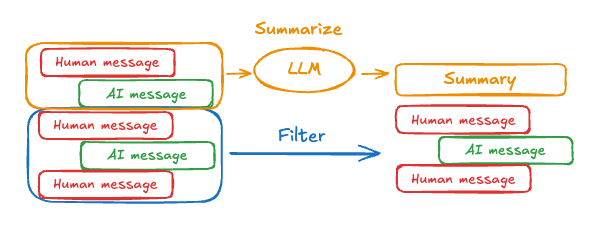
To summarize message history in an agent, use the built-in SummarizationMiddleware (opens in a new tab):
from langchain.agents import create_agent
from langchain.agents.middleware import SummarizationMiddleware
from langgraph.checkpoint.memory import InMemorySaver
from langchain_core.runnables import RunnableConfig


checkpointer = InMemorySaver()

agent = create_agent(
    model="gpt-5.5",
    tools=[...],
    middleware=[
        SummarizationMiddleware(
            model="gpt-5.4-mini",
            trigger=("tokens", 4000),
            keep=("messages", 20)
        )
    ],
    checkpointer=checkpointer,
)

config: RunnableConfig = {"configurable": {"thread_id": "1"}}
agent.invoke({"messages": "hi, my name is bob"}, config)
agent.invoke({"messages": "write a short poem about cats"}, config)
agent.invoke({"messages": "now do the same but for dogs"}, config)
final_response = agent.invoke({"messages": "what's my name?"}, config)

final_response["messages"][-1].pretty_print()
"""
================================== Ai Message ==================================

Your name is Bob!
"""
See SummarizationMiddleware (opens in a new tab) for more configuration options.
Access memory
You can access and modify the short-term memory (state) of an agent in several ways:
Tools
Read short-term memory in a tool
Access short term memory (state) in a tool using the runtime parameter (typed as ToolRuntime).
The runtime parameter is hidden from the tool signature (so the model doesn't see it), but the tool can access the state through it.
from langchain.agents import create_agent, AgentState
from langchain.tools import tool, ToolRuntime


class CustomState(AgentState):
    user_id: str

@tool
def get_user_info(
    runtime: ToolRuntime
) -> str:
    """Look up user info."""
    user_id = runtime.state["user_id"]
    return "User is John Smith" if user_id == "user_123" else "Unknown user"

agent = create_agent(
    model="gpt-5-nano",
    tools=[get_user_info],
    state_schema=CustomState,
)

result = agent.invoke({
    "messages": "look up user information",
    "user_id": "user_123"
})
print(result["messages"][-1].content)
# > User is John Smith.
Write short-term memory from tools
To modify the agent's short-term memory (state) during execution, you can return state updates directly from the tools.
This is useful for persisting intermediate results or making information accessible to subsequent tools or prompts.
from langchain.tools import tool, ToolRuntime
from langchain_core.runnables import RunnableConfig
from langchain.messages import ToolMessage
from langchain.agents import create_agent, AgentState
from langgraph.types import Command
from pydantic import BaseModel


class CustomState(AgentState):  # [!code highlight]
    user_name: str

class CustomContext(BaseModel):
    user_id: str

@tool
def update_user_info(
    runtime: ToolRuntime[CustomContext, CustomState],
) -> Command:
    """Look up and update user info."""
    user_id = runtime.context.user_id
    name = "John Smith" if user_id == "user_123" else "Unknown user"
    return Command(update={  # [!code highlight]
        "user_name": name,
        # update the message history
        "messages": [
            ToolMessage(
                "Successfully looked up user information",
                tool_call_id=runtime.tool_call_id
            )
        ]
    })

@tool
def greet(
    runtime: ToolRuntime[CustomContext, CustomState]
) -> str | Command:
    """Use this to greet the user once you found their info."""
    user_name = runtime.state.get("user_name", None)
    if user_name is None:
       return Command(update={
            "messages": [
                ToolMessage(
                    "Please call the 'update_user_info' tool it will get and update the user's name.",
                    tool_call_id=runtime.tool_call_id
                )
            ]
        })
    return f"Hello {user_name}!"

agent = create_agent(
    model="gpt-5-nano",
    tools=[update_user_info, greet],
    state_schema=CustomState, # [!code highlight]
    context_schema=CustomContext,
)

agent.invoke(
    {"messages": [{"role": "user", "content": "greet the user"}]},
    context=CustomContext(user_id="user_123"),
)
Prompt
Access short term memory (state) in middleware to create dynamic prompts based on conversation history or custom state fields.
from langchain.agents import create_agent
from typing import TypedDict
from langchain.agents.middleware import dynamic_prompt, ModelRequest


class CustomContext(TypedDict):
    user_name: str


def get_weather(city: str) -> str:
    """Get the weather in a city."""
    return f"The weather in {city} is always sunny!"


@dynamic_prompt
def dynamic_system_prompt(request: ModelRequest) -> str:
    user_name = request.runtime.context["user_name"]
    system_prompt = f"You are a helpful assistant. Address the user as {user_name}."
    return system_prompt


agent = create_agent(
    model="gpt-5-nano",
    tools=[get_weather],
    middleware=[dynamic_system_prompt],
    context_schema=CustomContext,
)

result = agent.invoke(
    {"messages": [{"role": "user", "content": "What is the weather in SF?"}]},
    context=CustomContext(user_name="John Smith"),
)
for msg in result["messages"]:
    msg.pretty_print()
Before model
Access short term memory (state) in @[@before_model] middleware to process messages before model calls.
%%{
    init: {
        "fontFamily": "monospace",
        "flowchart": {
        "curve": "basis"
        }
    }
}%%
graph TD
    S(["`\_\_start\_\_`"])
    PRE(before_model)
    MODEL(model)
    TOOLS(tools)
    END(["`\_\_end\_\_`"])
    S --> PRE
    PRE --> MODEL
    MODEL -.-> TOOLS
    MODEL -.-> END
    TOOLS --> PRE
    classDef blueHighlight fill:#E5F4FF,stroke:#006DDD,color:#030710;
    classDef neutral fill:#F2FAFF,stroke:#40668D,stroke-width:2px,color:#2F4B68;
    class S blueHighlight;
    class END blueHighlight;
    class PRE,MODEL,TOOLS neutral;
from langchain.messages import RemoveMessage
from langgraph.graph.message import REMOVE_ALL_MESSAGES
from langgraph.checkpoint.memory import InMemorySaver
from langchain.agents import create_agent, AgentState
from langchain.agents.middleware import before_model
from langchain_core.runnables import RunnableConfig
from langgraph.runtime import Runtime
from typing import Any
@before_model
def trim_messages(state: AgentState, runtime: Runtime) -> dict[str, Any] | None:
"""Keep only the last few messages to fit context window."""
messages = state["messages"]
if len(messages) <= 3:
return None # No changes needed
first_msg = messages[0]
recent_messages = messages[-3:] if len(messages) % 2 == 0 else messages[-4:]
new_messages = [first_msg] + recent_messages
return {
"messages": [
RemoveMessage(id=REMOVE_ALL_MESSAGES),
*new_messages
]
}
agent = create_agent(
"gpt-5-nano",
tools=[],
middleware=[trim_messages],
checkpointer=InMemorySaver()
)
config: RunnableConfig = {"configurable": {"thread_id": "1"}}
agent.invoke({"messages": "hi, my name is bob"}, config)
agent.invoke({"messages": "write a short poem about cats"}, config)
agent.invoke({"messages": "now do the same but for dogs"}, config)
final_response = agent.invoke({"messages": "what's my name?"}, config)
final_response["messages"][-1].pretty_print()
"""
================================== Ai Message ==================================
Your name is Bob. You told me that earlier.
If you'd like me to call you a nickname or use a different name, just say the word.
"""After model
Access short term memory (state) in @[@after_model] middleware to process messages after model calls.
%%{
    init: {
        "fontFamily": "monospace",
        "flowchart": {
        "curve": "basis"
        }
    }
}%%
graph TD
    S(["\_\_start\_\_"])
    MODEL(model)
    POST(after_model)
    TOOLS(tools)
    END(["\_\_end\_\_"])
    S --> MODEL
    MODEL --> POST
    POST -.-> END
    POST -.-> TOOLS
    TOOLS --> MODEL
    classDef blueHighlight fill:#E5F4FF,stroke:#006DDD,color:#030710;
    classDef greenHighlight fill:#F6FFDB,stroke:#6E8900,color:#2E3900;
    classDef neutral fill:#F2FAFF,stroke:#40668D,stroke-width:2px,color:#2F4B68;
    class S blueHighlight;
    class END blueHighlight;
    class POST greenHighlight;
    class MODEL,TOOLS neutral;
from langchain.messages import RemoveMessage
from langgraph.checkpoint.memory import InMemorySaver
from langchain.agents import create_agent, AgentState
from langchain.agents.middleware import after_model
from langgraph.runtime import Runtime
@after_model
def validate_response(state: AgentState, runtime: Runtime) -> dict | None:
"""Remove messages containing sensitive words."""
STOP_WORDS = ["password", "secret"]
last_message = state["messages"][-1]
if any(word in last_message.content for word in STOP_WORDS):
return {"messages": [RemoveMessage(id=last_message.id)]}
return None
agent = create_agent(
model="gpt-5-nano",
tools=[],
middleware=[validate_response],
checkpointer=InMemorySaver(),
)