Use the graph API
This guide demonstrates the basics of LangGraph's Graph API. It walks through state, as well as composing common graph structures such as sequences, branches, and loops. It also covers LangGraph's control features, including the Send API for map-reduce workflows and the Command API for combining state updates with "hops" across nodes.
Setup
Install langgraph:
pip install -U langgraphuv add langgraphSet up LangSmith for better debugging
Sign up for LangSmith (opens in a new tab) to quickly spot issues and improve the performance of your LangGraph projects. LangSmith lets you use trace data to debug, test, and monitor your LLM apps built with LangGraph—read more about how to get started in the docs.
Define and update state
Here we show how to define and update state (opens in a new tab) in LangGraph. We will demonstrate:
- How to use state to define a graph's schema (opens in a new tab)
- How to use reducers (opens in a new tab) to control how state updates are processed.
Define state
State (opens in a new tab) in LangGraph can be a TypedDict, Pydantic model, or dataclass. Below we will use TypedDict. See Use Pydantic models for graph state for detail on using Pydantic.
By default, graphs will have the same input and output schema, and the state determines that schema. See Define input and output schemas for how to define distinct input and output schemas.
Let's consider a simple example using messages (opens in a new tab). This represents a versatile formulation of state for many LLM applications. See our concepts page (opens in a new tab) for more detail.
from langchain.messages import AnyMessage
from typing_extensions import TypedDict

class State(TypedDict):
    messages: list[AnyMessage]
    extra_field: int
This state tracks a list of message (opens in a new tab) objects, as well as an extra integer field.
Update state
Let's build an example graph with a single node. Our node (opens in a new tab) is just a Python function that reads our graph's state and makes updates to it. The first argument to this function will always be the state:
from langchain.messages import AIMessage

def node(state: State):
    messages = state["messages"]
    new_message = AIMessage("Hello!")
    return {"messages": messages + [new_message], "extra_field": 10}
This node simply appends a message to our message list, and populates an extra field.
Nodes should return updates to the state directly, instead of mutating the state.
Let's next define a simple graph containing this node. We use StateGraph (opens in a new tab) to define a graph that operates on this state. We then use add_node (opens in a new tab) populate our graph.
from langgraph.graph import StateGraph

builder = StateGraph(State)
builder.add_node(node)
builder.set_entry_point("node")
graph = builder.compile()
LangGraph provides built-in utilities for visualizing your graph. Let's inspect our graph. See Visualize your graph for detail on visualization.
from IPython.display import Image, display

display(Image(graph.get_graph().draw_mermaid_png()))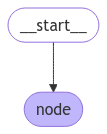
In this case, our graph just executes a single node. Let's proceed with a simple invocation:
from langchain.messages import HumanMessage

result = graph.invoke({"messages": [HumanMessage("Hi")]})
result
{'messages': [HumanMessage(content='Hi'), AIMessage(content='Hello!')], 'extra_field': 10}Note that:
- We kicked off invocation by updating a single key of the state.
- We receive the entire state in the invocation result.
For convenience, we frequently inspect the content of message objects (opens in a new tab) via pretty-print:
for message in result["messages"]:
    message.pretty_print()
================================ Human Message ================================
Hi
================================== Ai Message ==================================
Hello!Process state updates with reducers
Each key in the state can have its own independent reducer (opens in a new tab) function, which controls how updates from nodes are applied. If no reducer function is explicitly specified then it is assumed that all updates to the key should override it.
For TypedDict state schemas, we can define reducers by annotating the corresponding field of the state with a reducer function.
In the earlier example, our node updated the "messages" key in the state by appending a message to it. Below, we add a reducer to this key, such that updates are automatically appended:
from typing_extensions import Annotated

def add(left, right):
    """Can also import `add` from the `operator` built-in."""
    return left + right

class State(TypedDict):
    messages: Annotated[list[AnyMessage], add]  # [!code highlight]
    extra_field: int
Now our node can be simplified:
def node(state: State):
    new_message = AIMessage("Hello!")
    return {"messages": [new_message], "extra_field": 10}  # [!code highlight]
from langgraph.graph import START
graph = StateGraph(State).add_node(node).add_edge(START, "node").compile()
result = graph.invoke({"messages": [HumanMessage("Hi")]})
for message in result["messages"]:
message.pretty_print()================================ Human Message ================================
Hi
================================== Ai Message ==================================
Hello!MessagesState
In practice, there are additional considerations for updating lists of messages:
- We may wish to update an existing message in the state.
- We may want to accept short-hands for message formats (opens in a new tab), such as OpenAI format (opens in a new tab).
LangGraph includes a built-in reducer @[add_messages] that handles these considerations:
from langgraph.graph.message import add_messages

class State(TypedDict):
    messages: Annotated[list[AnyMessage], add_messages]  # [!code highlight]
    extra_field: int

def node(state: State):
    new_message = AIMessage("Hello!")
    return {"messages": [new_message], "extra_field": 10}

graph = StateGraph(State).add_node(node).set_entry_point("node").compile()
input_message = {"role": "user", "content": "Hi"} # [!code highlight]
result = graph.invoke({"messages": [input_message]})
for message in result["messages"]:
message.pretty_print()================================ Human Message ================================
Hi
================================== Ai Message ==================================
Hello!This is a versatile representation of state for applications involving chat models (opens in a new tab). LangGraph includes a prebuilt MessagesState for convenience, so that we can have:
from langgraph.graph import MessagesState

class State(MessagesState):
    extra_field: int
Bypass reducers with Overwrite
In some cases, you may want to bypass a reducer and directly overwrite a state value. LangGraph provides the Overwrite (opens in a new tab) type for this purpose. When a node returns a value wrapped with Overwrite, the reducer is bypassed and the channel is set directly to that value.
This is useful when you want to reset or replace accumulated state rather than merge it with existing values.
from langgraph.graph import StateGraph, START, END
from langgraph.types import Overwrite
from typing_extensions import Annotated, TypedDict

class State(TypedDict):
    messages: Annotated[list, operator.add]

def add_message(state: State):
    return {"messages": ["first message"]}

def replace_messages(state: State):
    # Bypass the reducer and replace the entire messages list
    return {"messages": Overwrite(["replacement message"])}

builder = StateGraph(State)
builder.add_node("add_message", add_message)
builder.add_node("replace_messages", replace_messages)
builder.add_edge(START, "add_message")
builder.add_edge("add_message", "replace_messages")
builder.add_edge("replace_messages", END)

graph = builder.compile()

result = graph.invoke({"messages": ["initial"]})
print(result["messages"])
['replacement message']You can also use JSON format with the special key "__overwrite__":
def replace_messages(state: State):
    return {"messages": {"__overwrite__": ["replacement message"]}}
When nodes execute in parallel, only one node can use
Overwriteon the same state key in a given super-step. If multiple nodes attempt to overwrite the same key in the same super-step, anInvalidUpdateErrorwill be raised.
Define input and output schemas
By default, StateGraph operates with a single schema, and all nodes are expected to communicate using that schema. However, it's also possible to define distinct input and output schemas for a graph.
When distinct schemas are specified, an internal schema will still be used for communication between nodes. The input schema ensures that the provided input matches the expected structure, while the output schema filters the internal data to return only the relevant information according to the defined output schema.
Below, we'll see how to define distinct input and output schema.
from langgraph.graph import StateGraph, START, END
from typing_extensions import TypedDict

# Define the schema for the input
class InputState(TypedDict):
    question: str

# Define the schema for the output
class OutputState(TypedDict):
    answer: str

# Define the overall schema, combining both input and output
class OverallState(InputState, OutputState):
    pass

# Define the node that processes the input and generates an answer
def answer_node(state: InputState):
    # Example answer and an extra key
    return {"answer": "bye", "question": state["question"]}

# Build the graph with input and output schemas specified
builder = StateGraph(OverallState, input_schema=InputState, output_schema=OutputState)
builder.add_node(answer_node)  # Add the answer node
builder.add_edge(START, "answer_node")  # Define the starting edge
builder.add_edge("answer_node", END)  # Define the ending edge
graph = builder.compile()  # Compile the graph

# Invoke the graph with an input and print the result
print(graph.invoke({"question": "hi"}))
{'answer': 'bye'}Notice that the output of invoke only includes the output schema.
Pass private state between nodes
In some cases, you may want nodes to exchange information that is crucial for intermediate logic but doesn't need to be part of the main schema of the graph. This private data is not relevant to the overall input/output of the graph and should only be shared between certain nodes.
Below, we'll create an example sequential graph consisting of three nodes (node_1, node_2 and node_3), where private data is passed between the first two steps (node_1 and node_2), while the third step (node_3) only has access to the public overall state.
from langgraph.graph import StateGraph, START, END
from typing_extensions import TypedDict

# The overall state of the graph (this is the public state shared across nodes)
class OverallState(TypedDict):
    a: str

# Output from node_1 contains private data that is not part of the overall state
class Node1Output(TypedDict):
    private_data: str

# The private data is only shared between node_1 and node_2
def node_1(state: OverallState) -> Node1Output:
    output = {"private_data": "set by node_1"}
    print(f"Entered node `node_1`:\n\tInput: {state}.\n\tReturned: {output}")
    return output

# Node 2 input only requests the private data available after node_1
class Node2Input(TypedDict):
    private_data: str

def node_2(state: Node2Input) -> OverallState:
    output = {"a": "set by node_2"}
    print(f"Entered node `node_2`:\n\tInput: {state}.\n\tReturned: {output}")
    return output

# Node 3 only has access to the overall state (no access to private data from node_1)
def node_3(state: OverallState) -> OverallState:
    output = {"a": "set by node_3"}
    print(f"Entered node `node_3`:\n\tInput: {state}.\n\tReturned: {output}")
    return output

# Connect nodes in a sequence
# node_2 accepts private data from node_1, whereas
# node_3 does not see the private data.
builder = StateGraph(OverallState).add_sequence([node_1, node_2, node_3])
builder.add_edge(START, "node_1")
graph = builder.compile()

# Invoke the graph with the initial state
response = graph.invoke(
    {
        "a": "set at start",
    }
)

print()
print(f"Output of graph invocation: {response}")
Entered node `node_1`:
Input: {'a': 'set at start'}.
Returned: {'private_data': 'set by node_1'}
Entered node `node_2`:
Input: {'private_data': 'set by node_1'}.
Returned: {'a': 'set by node_2'}
Entered node `node_3`:
Input: {'a': 'set by node_2'}.
Returned: {'a': 'set by node_3'}
Output of graph invocation: {'a': 'set by node_3'}Use pydantic models for graph state
A @[StateGraph] accepts a @[state_schema] argument on initialization that specifies the "shape" of the state that the nodes in the graph can access and update.
In our examples, we typically use a python-native TypedDict or dataclass (opens in a new tab) for state_schema, but @[state_schema] can be any type (opens in a new tab).
Here, we'll see how a Pydantic BaseModel (opens in a new tab) can be used for @[state_schema] to add run-time validation on inputs.
Known Limitations
- Currently, the output of the graph will NOT be an instance of a pydantic model.
- Run-time validation only occurs on inputs to the first node in the graph, not on subsequent nodes or outputs.
- The validation error trace from pydantic does not show which node the error arises in.
- Pydantic's recursive validation can be slow. For performance-sensitive applications, you may want to consider using a
dataclassinstead.
from langgraph.graph import StateGraph, START, END
from typing_extensions import TypedDict
from pydantic import BaseModel

# The overall state of the graph (this is the public state shared across nodes)
class OverallState(BaseModel):
    a: str

def node(state: OverallState):
    return {"a": "goodbye"}

# Build the state graph
builder = StateGraph(OverallState)
builder.add_node(node)  # node_1 is the first node
builder.add_edge(START, "node")  # Start the graph with node_1
builder.add_edge("node", END)  # End the graph after node_1
graph = builder.compile()

# Test the graph with a valid input
graph.invoke({"a": "hello"})
Invoke the graph with an invalid input
try:
    graph.invoke({"a": 123})  # Should be a string
except Exception as e:
    print("An exception was raised because `a` is an integer rather than a string.")
    print(e)
An exception was raised because `a` is an integer rather than a string.
1 validation error for OverallState
a
Input should be a valid string [type=string_type, input_value=123, input_type=int]
For further information visit https://errors.pydantic.dev/2.9/v/string_typeSee below for additional features of Pydantic model state:
Serialization Behavior
When using Pydantic models as state schemas, it's important to understand how serialization works, especially when:
- Passing Pydantic objects as inputs
- Receiving outputs from the graph
- Working with nested Pydantic models
Let's see these behaviors in action.
from langgraph.graph import StateGraph, START, END
from pydantic import BaseModel

class NestedModel(BaseModel):
    value: str

class ComplexState(BaseModel):
    text: str
    count: int
    nested: NestedModel

def process_node(state: ComplexState):
    # Node receives a validated Pydantic object
    print(f"Input state type: {type(state)}")
    print(f"Nested type: {type(state.nested)}")
    # Return a dictionary update
    return {"text": state.text + " processed", "count": state.count + 1}

# Build the graph
builder = StateGraph(ComplexState)
builder.add_node("process", process_node)
builder.add_edge(START, "process")
builder.add_edge("process", END)
graph = builder.compile()

# Create a Pydantic instance for input
input_state = ComplexState(text="hello", count=0, nested=NestedModel(value="test"))
print(f"Input object type: {type(input_state)}")

# Invoke graph with a Pydantic instance
result = graph.invoke(input_state)
print(f"Output type: {type(result)}")
print(f"Output content: {result}")

# Convert back to Pydantic model if needed
output_model = ComplexState(**result)
print(f"Converted back to Pydantic: {type(output_model)}")
Runtime Type Coercion
Pydantic performs runtime type coercion for certain data types. This can be helpful but also lead to unexpected behavior if you're not aware of it.
from langgraph.graph import StateGraph, START, END
from pydantic import BaseModel

class CoercionExample(BaseModel):
    # Pydantic will coerce string numbers to integers
    number: int
    # Pydantic will parse string booleans to bool
    flag: bool

def inspect_node(state: CoercionExample):
    print(f"number: {state.number} (type: {type(state.number)})")
    print(f"flag: {state.flag} (type: {type(state.flag)})")
    return {}

builder = StateGraph(CoercionExample)
builder.add_node("inspect", inspect_node)
builder.add_edge(START, "inspect")
builder.add_edge("inspect", END)
graph = builder.compile()

# Demonstrate coercion with string inputs that will be converted
result = graph.invoke({"number": "42", "flag": "true"})

# This would fail with a validation error
try:
    graph.invoke({"number": "not-a-number", "flag": "true"})
except Exception as e:
    print(f"\nExpected validation error: {e}")
Working with Message Models
When working with LangChain message types in your state schema, there are important considerations for serialization. You should use AnyMessage (rather than BaseMessage) for proper serialization/deserialization when using message objects over the wire.
from langgraph.graph import StateGraph, START, END
from pydantic import BaseModel
from langchain.messages import HumanMessage, AIMessage, AnyMessage
from typing import List

class ChatState(BaseModel):
    messages: List[AnyMessage]
    context: str

def add_message(state: ChatState):
    return {"messages": state.messages + [AIMessage(content="Hello there!")]}

builder = StateGraph(ChatState)
builder.add_node("add_message", add_message)
builder.add_edge(START, "add_message")
builder.add_edge("add_message", END)
graph = builder.compile()

# Create input with a message
initial_state = ChatState(
    messages=[HumanMessage(content="Hi")], context="Customer support chat"
)

result = graph.invoke(initial_state)
print(f"Output: {result}")

# Convert back to Pydantic model to see message types
output_model = ChatState(**result)
for i, msg in enumerate(output_model.messages):
    print(f"Message {i}: {type(msg).__name__} - {msg.content}")
Add runtime configuration
Sometimes you want to be able to configure your graph when calling it. For example, you might want to be able to specify what LLM or system prompt to use at runtime, without polluting the graph state with these parameters.
To add runtime configuration:
- Specify a schema for your configuration
- Add the configuration to the function signature for nodes or conditional edges
- Pass the configuration into the graph.
See below for a simple example:
from langgraph.graph import END, StateGraph, START
from langgraph.runtime import Runtime
from typing_extensions import TypedDict

# 1. Specify config schema
class ContextSchema(TypedDict):
    my_runtime_value: str

# 2. Define a graph that accesses the config in a node
class State(TypedDict):
    my_state_value: str

def node(state: State, runtime: Runtime[ContextSchema]):  # [!code highlight]
    if runtime.context["my_runtime_value"] == "a":  # [!code highlight]
        return {"my_state_value": 1}
    elif runtime.context["my_runtime_value"] == "b":  # [!code highlight]
        return {"my_state_value": 2}
    else:
        raise ValueError("Unknown values.")

builder = StateGraph(State, context_schema=ContextSchema)  # [!code highlight]
builder.add_node(node)
builder.add_edge(START, "node")
builder.add_edge("node", END)

graph = builder.compile()

# 3. Pass in configuration at runtime:
print(graph.invoke({}, context={"my_runtime_value": "a"}))  # [!code highlight]
print(graph.invoke({}, context={"my_runtime_value": "b"}))  # [!code highlight]
{'my_state_value': 1}
{'my_state_value': 2}Extended example: specifying LLM at runtime
:::python Below we demonstrate a practical example in which we configure what LLM to use at runtime. We will use both OpenAI and Anthropic models.
from dataclasses import dataclass

from langchain.chat_models import init_chat_model
from langgraph.graph import MessagesState, END, StateGraph, START
from langgraph.runtime import Runtime
from typing_extensions import TypedDict

@dataclass
class ContextSchema:
    model_provider: str = "anthropic"

MODELS = {
    "anthropic": init_chat_model("claude-haiku-4-5-20251001"),
    "openai": init_chat_model("gpt-5.4-mini"),
}

def call_model(state: MessagesState, runtime: Runtime[ContextSchema]):
    model = MODELS[runtime.context.model_provider]
    response = model.invoke(state["messages"])
    return {"messages": [response]}

builder = StateGraph(MessagesState, context_schema=ContextSchema)
builder.add_node("model", call_model)
builder.add_edge(START, "model")
builder.add_edge("model", END)

graph = builder.compile()

# Usage
input_message = {"role": "user", "content": "hi"}
# With no configuration, uses default (Anthropic)
response_1 = graph.invoke({"messages": [input_message]}, context=ContextSchema())["messages"][-1]
# Or, can set OpenAI
response_2 = graph.invoke({"messages": [input_message]}, context={"model_provider": "openai"})["messages"][-1]

print(response_1.response_metadata["model_name"])
print(response_2.response_metadata["model_name"])
claude-haiku-4-5-20251001
gpt-5.4-mini:::
:::js Below we demonstrate a practical example in which we configure what LLM to use at runtime. We will use both OpenAI and Anthropic models.
import { ChatOpenAI } from "@langchain/openai";
import { ChatAnthropic } from "@langchain/anthropic";
import { StateGraph, StateSchema, MessagesValue, GraphNode, START, END } from "@langchain/langgraph";
import * as z from "zod";

const ConfigSchema = z.object({
  modelProvider: z.string().default("anthropic"),
});

const State = new StateSchema({
  messages: MessagesValue,
});

const MODELS = {
  anthropic: new ChatAnthropic({ model: "claude-haiku-4-5-20251001" }),
  openai: new ChatOpenAI({ model: "gpt-5.4-mini" }),
};

const callModel: GraphNode<typeof State> = async (state, config) => {
  const modelProvider = config?.configurable?.modelProvider || "anthropic";
  const model = MODELS[modelProvider as keyof typeof MODELS];
  const response = await model.invoke(state.messages);
  return { messages: [response] };
};

const graph = new StateGraph(State, ConfigSchema)
  .addNode("model", callModel)
  .addEdge(START, "model")
  .addEdge("model", END)
  .compile();

// Usage
const inputMessage = { role: "user", content: "hi" };
// With no configuration, uses default (Anthropic)
const response1 = await graph.invoke({ messages: [inputMessage] });
// Or, can set OpenAI
const response2 = await graph.invoke(
  { messages: [inputMessage] },
  { configurable: { modelProvider: "openai" } },
);

console.log(response1.messages.at(-1)?.response_metadata?.model);
console.log(response2.messages.at(-1)?.response_metadata?.model);
claude-haiku-4-5-20251001
gpt-5.4-mini:::
Extended example: specifying model and system message at runtime
:::python Below we demonstrate a practical example in which we configure two parameters: the LLM and system message to use at runtime.
from dataclasses import dataclass
from langchain.chat_models import init_chat_model
from langchain.messages import SystemMessage
from langgraph.graph import END, MessagesState, StateGraph, START
from langgraph.runtime import Runtime
from typing_extensions import TypedDict

@dataclass
class ContextSchema:
    model_provider: str = "anthropic"
    system_message: str | None = None

MODELS = {
    "anthropic": init_chat_model("claude-haiku-4-5-20251001"),
    "openai": init_chat_model("gpt-5.4-mini"),
}

def call_model(state: MessagesState, runtime: Runtime[ContextSchema]):
    model = MODELS[runtime.context.model_provider]
    messages = state["messages"]
    if (system_message := runtime.context.system_message):
        messages = [SystemMessage(system_message)] + messages
    response = model.invoke(messages)
    return {"messages": [response]}

builder = StateGraph(MessagesState, context_schema=ContextSchema)
builder.add_node("model", call_model)
builder.add_edge(START, "model")
builder.add_edge("model", END)

graph = builder.compile()

# Usage
input_message = {"role": "user", "content": "hi"}
response = graph.invoke({"messages": [input_message]}, context={"model_provider": "openai", "system_message": "Respond in Italian."})
for message in response["messages"]:
    message.pretty_print()
================================ Human Message ================================
hi
================================== Ai Message ==================================
Ciao! Come posso aiutarti oggi?:::
:::js Below we demonstrate a practical example in which we configure two parameters: the LLM and system message to use at runtime.
import { ChatOpenAI } from "@langchain/openai";
import { ChatAnthropic } from "@langchain/anthropic";
import { SystemMessage } from "@langchain/core/messages";
import { StateGraph, StateSchema, MessagesValue, GraphNode, START, END } from "@langchain/langgraph";
import * as z from "zod";

const ConfigSchema = z.object({
  modelProvider: z.string().default("anthropic"),
  systemMessage: z.string().optional(),
});

const State = new StateSchema({
  messages: MessagesValue,
});

const MODELS = {
  anthropic: new ChatAnthropic({ model: "claude-haiku-4-5-20251001" }),
  openai: new ChatOpenAI({ model: "gpt-5.4-mini" }),
};

const callModel: GraphNode<typeof State> = async (state, config) => {
  const modelProvider = config?.configurable?.modelProvider || "anthropic";
  const systemMessage = config?.configurable?.systemMessage;

  const model = MODELS[modelProvider as keyof typeof MODELS];
  let messages = state.messages;

  if (systemMessage) {
    messages = [new SystemMessage(systemMessage), ...messages];
  }

  const response = await model.invoke(messages);
  return { messages: [response] };
};

const graph = new StateGraph(State, ConfigSchema)
  .addNode("model", callModel)
  .addEdge(START, "model")
  .addEdge("model", END)
  .compile();

// Usage
const inputMessage = { role: "user", content: "hi" };
const response = await graph.invoke(
  { messages: [inputMessage] },
  {
    configurable: {
      modelProvider: "openai",
      systemMessage: "Respond in Italian."
    }
  }
);

for (const message of response.messages) {
  console.log(`${message.getType()}: ${message.content}`);
}
human: hi
ai: Ciao! Come posso aiutarti oggi?:::
Add retry policies
There are many use cases where you may wish for your node to have a custom retry policy, for example if you are calling an API, querying a database, or calling an LLM, etc. LangGraph lets you add retry policies to nodes.
To configure a retry policy, pass the retry_policy parameter to the @[add_node]. The retry_policy parameter takes in a RetryPolicy named tuple object. Below we instantiate a RetryPolicy object with the default parameters and associate it with a node:
from langgraph.types import RetryPolicy

builder.add_node(
    "node_name",
    node_function,
    retry_policy=RetryPolicy(),
)
By default, the retry_on parameter uses the default_retry_on function, which retries on any exception except for the following:
ValueErrorTypeErrorArithmeticErrorImportErrorLookupErrorNameErrorSyntaxErrorRuntimeErrorReferenceErrorStopIterationStopAsyncIterationOSError
In addition, for exceptions from popular http request libraries such as requests and httpx it only retries on 5xx status codes.
Extended example: customizing retry policies
:::python Consider an example in which we are reading from a SQL database. Below we pass two different retry policies to nodes:
import sqlite3
from typing_extensions import TypedDict
from langchain.chat_models import init_chat_model
from langgraph.graph import END, MessagesState, StateGraph, START
from langgraph.types import RetryPolicy
from langchain.messages import AIMessage

con = sqlite3.connect(":memory:")
model = init_chat_model("claude-haiku-4-5-20251001")

def query_database(state: MessagesState):
    cursor = con.cursor()
    cursor.execute("SELECT * FROM Artist LIMIT 10;")
    query_result = str(cursor.fetchall())
    return {"messages": [AIMessage(content=query_result)]}

def call_model(state: MessagesState):
    response = model.invoke(state["messages"])
    return {"messages": [response]}

# Define a new graph
builder = StateGraph(MessagesState)
builder.add_node(
    "query_database",
    query_database,
    retry_policy=RetryPolicy(retry_on=sqlite3.OperationalError),
)
builder.add_node("model", call_model, retry_policy=RetryPolicy(max_attempts=5))
builder.add_edge(START, "model")
builder.add_edge("model", "query_database")
builder.add_edge("query_database", END)
graph = builder.compile()
:::
:::js Consider an example in which we are reading from a SQL database. Below we pass two different retry policies to nodes:
import Database from "better-sqlite3";
import { ChatAnthropic } from "@langchain/anthropic";
import { StateGraph, StateSchema, MessagesValue, GraphNode, START, END } from "@langchain/langgraph";
import { AIMessage } from "@langchain/core/messages";

const State = new StateSchema({
  messages: MessagesValue,
});

// Create an in-memory database
const db: typeof Database.prototype = new Database(":memory:");

const model = new ChatAnthropic({ model: "claude-sonnet-4-6" });

const callModel: GraphNode<typeof State> = async (state) => {
  const response = await model.invoke(state.messages);
  return { messages: [response] };
};

const queryDatabase: GraphNode<typeof State> = async (state) => {
  const queryResult: string = JSON.stringify(
    db.prepare("SELECT * FROM Artist LIMIT 10;").all(),
  );

  return { messages: [new AIMessage({ content: "queryResult" })] };
};

const workflow = new StateGraph(State)
  // Define the two nodes we will cycle between
  .addNode("call_model", callModel, { retryPolicy: { maxAttempts: 5 } })
  .addNode("query_database", queryDatabase, {
    retryPolicy: {
      retryOn: (e: any): boolean => {
        if (e instanceof Database.SqliteError) {
          // Retry on "SQLITE_BUSY" error
          return e.code === "SQLITE_BUSY";
        }
        return false; // Don't retry on other errors
      },
    },
  })
  .addEdge(START, "call_model")
  .addEdge("call_model", "query_database")
  .addEdge("query_database", END);

const graph = workflow.compile();
:::
Set node timeouts
Use the timeout parameter with @[add_node] to limit how long a single async node invocation can run. Provide the timeout in seconds or as a datetime.timedelta.
from typing_extensions import TypedDict

from langgraph.errors import NodeTimeoutError
from langgraph.graph import END, START, StateGraph


class State(TypedDict):
    value: str


async def call_model(state: State) -> State:
    await asyncio.sleep(2)
    return {"value": "done"}


builder = StateGraph(State)
builder.add_node("model", call_model, timeout=1.0)
builder.add_edge(START, "model")
builder.add_edge("model", END)
graph = builder.compile()

try:
    await graph.ainvoke({"value": "start"})
except NodeTimeoutError:
    print("Node timed out")
Node timeouts are supported only for async nodes. If you set timeout on a sync node, LangGraph raises an error when the graph is compiled because sync Python execution cannot be safely canceled in-process.
When a node exceeds its timeout, LangGraph raises NodeTimeoutError, which subclasses Python's built-in TimeoutError. If the node has a retry_policy that retries TimeoutError or NodeTimeoutError, the timed-out attempt is retried. The timeout applies to each attempt independently, so the timer resets for every retry.
Timed-out attempts do not commit their buffered writes. This prevents state updates or child-task scheduling from leaking out after the timeout boundary.
Configure node timeouts
The timeout= parameter on @[add_node] caps how long a single async node attempt may run. Pass a number (seconds), a timedelta, or a @[TimeoutPolicy] for finer control over run and idle timeouts. When the limit is exceeded, LangGraph raises @[NodeTimeoutError] and lets the retry policy decide whether to retry.
Per-node timeouts require
langgraph>=1.2.
from langgraph.types import TimeoutPolicy

builder.add_node(
    "call_model",
    call_model,
    timeout=TimeoutPolicy(run_timeout=120, idle_timeout=30),
)
See Fault tolerance (opens in a new tab) for the full timeout lifecycle, idle-timeout refresh sources, and runtime.heartbeat().
Handle node errors
The error_handler= parameter on @[add_node] registers a function that runs after a node fails and all retries are exhausted. The handler receives the current state and a typed @[NodeError] with failure context, and can route to a recovery branch via @[Command]:
Node-level error handlers require
langgraph>=1.2.
from langgraph.errors import NodeError
from langgraph.types import Command, RetryPolicy

def payment_error_handler(state: State, error: NodeError) -> Command:
    return Command(
        update={"status": f"compensated: {error.error}"},
        goto="finalize",
    )

builder.add_node(
    "charge_payment",
    charge_payment,
    retry_policy=RetryPolicy(max_attempts=3, retry_on=ConnectionError),
    error_handler=payment_error_handler,
)
See Fault tolerance (opens in a new tab) for compensation patterns and Command routing.
Set graph-wide node defaults
Requires
langgraph>=1.2.
Use @[set_node_defaults] to set retry_policy, timeout, cache_policy, or error_handler once for every node in a graph, instead of repeating them on each @[add_node] call. Per-node values always win, and defaults are applied at @[StateGraph.compile] time:
from langgraph.types import RetryPolicy, TimeoutPolicy

graph = (
    StateGraph(State)
    .set_node_defaults(
        retry_policy=RetryPolicy(max_attempts=3),
        timeout=TimeoutPolicy(run_timeout=30),
        error_handler=fallback_handler,
    )
    .add_node("a", node_a)
    .add_node("b", node_b, retry_policy=RetryPolicy(max_attempts=5))  # overrides default
    .add_edge(START, "a")
    .compile()
)
retry_policy and timeout defaults apply to every node, including error-handler nodes. cache_policy and error_handler defaults apply only to regular nodes—handlers never catch themselves, and caching a handler result is unsafe. Defaults are not inherited by subgraphs.
See Fault tolerance (opens in a new tab) for the full precedence rules and applicability table.
Access execution info inside a node
You can access execution identity and retry information via runtime.execution_info. This surfaces thread, run, and checkpoint identifiers as well as retry state, without needing to read from config directly.
| Attribute | Type | Description |
|---|---|---|
thread_id | str | None | Thread ID for the current execution. None without a checkpointer. |
run_id | str | None | Run ID for the current execution. None when not provided in config. |
checkpoint_id | str | Checkpoint ID for the current execution. |
checkpoint_ns | str | Checkpoint namespace for the current execution. |
task_id | str | Task ID for the current execution. |
node_attempt | int | Current execution attempt number (1-indexed). 1 on the first try, 2 on the first retry, etc. |
node_first_attempt_time | float | None | Unix timestamp (seconds) of when the first attempt started. Stays the same across retries. |
Access thread and run IDs
Use execution_info to access the thread ID, run ID, and other identity fields inside a node:
from langgraph.graph import StateGraph, START, END
from langgraph.runtime import Runtime
from typing_extensions import TypedDict

class State(TypedDict):
    result: str

def my_node(state: State, runtime: Runtime):
    info = runtime.execution_info
    print(f"Thread: {info.thread_id}, Run: {info.run_id}")  # [!code highlight]
    return {"result": "done"}

builder = StateGraph(State)
builder.add_node("my_node", my_node)
builder.add_edge(START, "my_node")
builder.add_edge("my_node", END)
graph = builder.compile()
Adjust behavior based on retry state
When a node has a retry policy, use execution_info to inspect the current attempt number and switch to a fallback after the first attempt fails:
from langgraph.graph import StateGraph, START, END
from langgraph.runtime import Runtime
from langgraph.types import RetryPolicy
from typing_extensions import TypedDict

class State(TypedDict):
    result: str

def my_node(state: State, runtime: Runtime):
    info = runtime.execution_info
    if info.node_attempt > 1:  # [!code highlight]
        # use a fallback on retries
        return {"result": call_fallback_api()}
    return {"result": call_primary_api()}

builder = StateGraph(State)
builder.add_node("my_node", my_node, retry_policy=RetryPolicy(max_attempts=3))
builder.add_edge(START, "my_node")
builder.add_edge("my_node", END)
graph = builder.compile()
execution_info is available on the Runtime object even without a retry policy — node_attempt defaults to 1 and node_first_attempt_time is set to the time the node starts executing.
Access server info inside a node
When your graph runs on LangGraph Server, you can access server-specific metadata via runtime.server_info. This surfaces the assistant ID, graph ID, and authenticated user without needing to read from config metadata or configurable keys directly.
| Attribute | Type | Description |
|---|---|---|
assistant_id | str | The assistant ID for the current deployment. |
graph_id | str | The graph ID for the current deployment. |
user | BaseUser | None | The authenticated user, if custom auth is configured. |
from langgraph.graph import StateGraph, START, END
from langgraph.runtime import Runtime
from typing_extensions import TypedDict

class State(TypedDict):
    result: str

def my_node(state: State, runtime: Runtime):
    server = runtime.server_info
    if server is not None:
        print(f"Assistant: {server.assistant_id}, Graph: {server.graph_id}")  # [!code highlight]
        if server.user is not None:
            print(f"User: {server.user.identity}")
    return {"result": "done"}

builder = StateGraph(State)
builder.add_node("my_node", my_node)
builder.add_edge(START, "my_node")
builder.add_edge("my_node", END)
graph = builder.compile()
server_info is None when the graph is not running on LangGraph Server (e.g., during local development or testing).
Requires
deepagents>=0.5.0(orlanggraph>=1.1.5) forruntime.execution_infoandruntime.server_info.
Access drain state inside a node
When a graceful shutdown (opens in a new tab) has been requested, runtime.drain_requested is True. Read this inside a node to skip expensive work before the next superstep boundary:
from langgraph.runtime import Runtime

def my_node(state: State, runtime: Runtime) -> State:
    if runtime.drain_requested:  # [!code highlight]
        return {"status": "skipped", "reason": runtime.drain_reason}
return {"status": do_work()}| Property | Type | Description |
|---|---|---|
drain_requested | bool | True if RunControl.request_drain() has been called for this run. |
drain_reason | str | None | The reason string passed to request_drain(), or None if drain was not requested. |
Requires
langgraph>=1.2. See Graceful shutdown (opens in a new tab) for the fullRunControlAPI.
Add node caching
Node caching is useful in cases where you want to avoid repeating operations, like when doing something expensive (either in terms of time or cost). LangGraph lets you add individualized caching policies to nodes in a graph.
To configure a cache policy, pass the cache_policy parameter to the @[add_node] function. In the following example, a @[CachePolicy] object is instantiated with a time to live of 120 seconds and the default key_func generator. Then it is associated with a node:
from langgraph.types import CachePolicy

builder.add_node(
    "node_name",
    node_function,
    cache_policy=CachePolicy(ttl=120),
)
Then, to enable node-level caching for a graph, set the cache argument when compiling the graph. The example below uses InMemoryCache to set up a graph with in-memory cache, but SqliteCache is also available.
from langgraph.cache.memory import InMemoryCache

graph = builder.compile(cache=InMemoryCache())
Create a sequence of steps
Prerequisites This guide assumes familiarity with the above section on state.
Here we demonstrate how to construct a simple sequence of steps. We will show:
- How to build a sequential graph
- Built-in short-hand for constructing similar graphs.
To add a sequence of nodes, we use the @[add_node] and @[add_edge] methods of our graph (opens in a new tab):
from langgraph.graph import START, StateGraph

builder = StateGraph(State)

# Add nodes
builder.add_node(step_1)
builder.add_node(step_2)
builder.add_node(step_3)

# Add edges
builder.add_edge(START, "step_1")
builder.add_edge("step_1", "step_2")
builder.add_edge("step_2", "step_3")
We can also use the built-in shorthand .add_sequence:
builder = StateGraph(State).add_sequence([step_1, step_2, step_3])
builder.add_edge(START, "step_1")
Why split application steps into a sequence with LangGraph?
LangGraph makes it easy to add an underlying persistence layer to your application. This allows state to be checkpointed in between the execution of nodes, so your LangGraph nodes govern:
- How state updates are checkpointed (opens in a new tab)
- How interruptions are resumed in human-in-the-loop (opens in a new tab) workflows
- How we can "rewind" and branch-off executions using LangGraph's time travel (opens in a new tab) features
They also determine how execution steps are streamed (opens in a new tab), and how your application is visualized and debugged using Studio.
Let's demonstrate an end-to-end example. We will create a sequence of three steps:
- Populate a value in a key of the state
- Update the same value
- Populate a different value
Let's first define our state (opens in a new tab). This governs the schema of the graph (opens in a new tab), and can also specify how to apply updates. See Process state updates with reducers for more detail.
In our case, we will just keep track of two values:
from typing_extensions import TypedDict

class State(TypedDict):
    value_1: str
    value_2: int
Our nodes (opens in a new tab) are just Python functions that read our graph's state and make updates to it. The first argument to this function will always be the state:
def step_1(state: State):
    return {"value_1": "a"}

def step_2(state: State):
    current_value_1 = state["value_1"]
    return {"value_1": f"{current_value_1} b"}

def step_3(state: State):
    return {"value_2": 10}
Note that when issuing updates to the state, each node can just specify the value of the key it wishes to update.
By default, this will overwrite the value of the corresponding key. You can also use reducers (opens in a new tab) to control how updates are processed—for example, you can append successive updates to a key instead. See Process state updates with reducers for more detail.
Finally, we define the graph. We use StateGraph (opens in a new tab) to define a graph that operates on this state.
We will then use add_node (opens in a new tab) and add_edge (opens in a new tab) to populate our graph and define its control flow.
from langgraph.graph import START, StateGraph

builder = StateGraph(State)

# Add nodes
builder.add_node(step_1)
builder.add_node(step_2)
builder.add_node(step_3)

# Add edges
builder.add_edge(START, "step_1")
builder.add_edge("step_1", "step_2")
builder.add_edge("step_2", "step_3")
Specifying custom names You can specify custom names for nodes using @[
add_node]:builder.add_node("my_node", step_1)
Note that:
- @[
add_edge] takes the names of nodes, which for functions defaults tonode.__name__. - We must specify the entry point of the graph. For this we add an edge with the START node (opens in a new tab).
- The graph halts when there are no more nodes to execute.
We next compile (opens in a new tab) our graph. This provides a few basic checks on the structure of the graph (e.g., identifying orphaned nodes). If we were adding persistence to our application via a checkpointer (opens in a new tab), it would also be passed in here.
graph = builder.compile()LangGraph provides built-in utilities for visualizing your graph. Let's inspect our sequence. See Visualize your graph for detail on visualization.
from IPython.display import Image, display

display(Image(graph.get_graph().draw_mermaid_png()))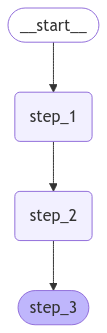
Let's proceed with a simple invocation:
graph.invoke({"value_1": "c"}){'value_1': 'a b', 'value_2': 10}Note that:
- We kicked off invocation by providing a value for a single state key. We must always provide a value for at least one key.
- The value we passed in was overwritten by the first node.
- The second node updated the value.
- The third node populated a different value.
Built-in shorthand
langgraph>=0.2.46includes a built-in short-handadd_sequencefor adding node sequences. You can compile the same graph as follows:builder = StateGraph(State).add_sequence([step_1, step_2, step_3]) # [!code highlight] builder.add_edge(START, "step_1") graph = builder.compile() graph.invoke({"value_1": "c"})
Create branches
Parallel execution of nodes is essential to speed up overall graph operation. LangGraph offers native support for parallel execution of nodes, which can significantly enhance the performance of graph-based workflows. This parallelization is achieved through fan-out and fan-in mechanisms, utilizing both standard edges and @[conditional_edges][add_conditional_edges]. Below are some examples showing how to add create branching dataflows that work for you.
Run graph nodes in parallel
In this example, we fan out from Node A to B and C and then fan in to D. With our state, we specify the reducer add operation (opens in a new tab). This will combine or accumulate values for the specific key in the State, rather than simply overwriting the existing value. For lists, this means concatenating the new list with the existing list. See the above section on state reducers for more detail on updating state with reducers.
from typing import Annotated, Any
from typing_extensions import TypedDict
from langgraph.graph import StateGraph, START, END

class State(TypedDict):
    # The operator.add reducer fn makes this append-only
    aggregate: Annotated[list, operator.add]

def a(state: State):
    print(f'Adding "A" to {state["aggregate"]}')
    return {"aggregate": ["A"]}

def b(state: State):
    print(f'Adding "B" to {state["aggregate"]}')
    return {"aggregate": ["B"]}

def c(state: State):
    print(f'Adding "C" to {state["aggregate"]}')
    return {"aggregate": ["C"]}

def d(state: State):
    print(f'Adding "D" to {state["aggregate"]}')
    return {"aggregate": ["D"]}

builder = StateGraph(State)
builder.add_node(a)
builder.add_node(b)
builder.add_node(c)
builder.add_node(d)
builder.add_edge(START, "a")
builder.add_edge("a", "b")
builder.add_edge("a", "c")
builder.add_edge("b", "d")
builder.add_edge("c", "d")
builder.add_edge("d", END)
graph = builder.compile()
from IPython.display import Image, display
display(Image(graph.get_graph().draw_mermaid_png()))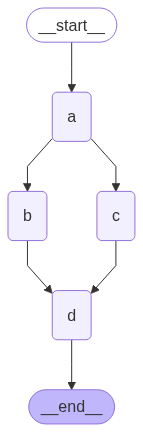
With the reducer, you can see that the values added in each node are accumulated.
graph.invoke({"aggregate": []}, {"configurable": {"thread_id": "foo"}})Adding "A" to []
Adding "B" to ['A']
Adding "C" to ['A']
Adding "D" to ['A', 'B', 'C']In the above example, nodes
"b"and"c"are executed concurrently in the same superstep (opens in a new tab). Because they are in the same step, node"d"executes after both"b"and"c"are finished.Importantly, updates from a parallel superstep may not be ordered consistently. If you need a consistent, predetermined ordering of updates from a parallel superstep, you should write the outputs to a separate field in the state together with a value with which to order them.
Exception handling?
LangGraph executes nodes within supersteps (opens in a new tab), meaning that while parallel branches are executed in parallel, the entire superstep is transactional. If any of these branches raises an exception, none of the updates are applied to the state (the entire superstep errors).
Importantly, when using a checkpointer (opens in a new tab), results from successful nodes within a superstep are saved, and don't repeat when resumed.
If you have error-prone (perhaps want to handle flakey API calls), LangGraph provides two ways to address this:
- You can write regular python code within your node to catch and handle exceptions.
- You can set a
RetryPolicy(opens in a new tab) to direct the graph to retry nodes that raise certain types of exceptions. Only failing branches are retried, so you needn't worry about performing redundant work.
Together, these let you perform parallel execution and fully control exception handling.
Set max concurrency You can control the maximum number of concurrent tasks by setting
max_concurrencyin the configuration (opens in a new tab) when invoking the graph.max_concurrencyis a standalone config key, so set it at the top level of the config rather than insideconfigurable.graph.invoke({"value_1": "c"}, {"max_concurrency": 10})
Defer node execution
Deferring node execution is useful when you want to delay the execution of a node until all other pending tasks are completed. This is particularly relevant when branches have different lengths, which is common in workflows like map-reduce flows.
The above example showed how to fan-out and fan-in when each path was only one step. But what if one branch had more than one step? Let's add a node "b_2" in the "b" branch:
from typing import Annotated, Any
from typing_extensions import TypedDict
from langgraph.graph import StateGraph, START, END

class State(TypedDict):
    # The operator.add reducer fn makes this append-only
    aggregate: Annotated[list, operator.add]

def a(state: State):
    print(f'Adding "A" to {state["aggregate"]}')
    return {"aggregate": ["A"]}

def b(state: State):
    print(f'Adding "B" to {state["aggregate"]}')
    return {"aggregate": ["B"]}

def b_2(state: State):
    print(f'Adding "B_2" to {state["aggregate"]}')
    return {"aggregate": ["B_2"]}

def c(state: State):
    print(f'Adding "C" to {state["aggregate"]}')
    return {"aggregate": ["C"]}

def d(state: State):
    print(f'Adding "D" to {state["aggregate"]}')
    return {"aggregate": ["D"]}

builder = StateGraph(State)
builder.add_node(a)
builder.add_node(b)
builder.add_node(b_2)
builder.add_node(c)
builder.add_node(d, defer=True)  # [!code highlight]
builder.add_edge(START, "a")
builder.add_edge("a", "b")
builder.add_edge("a", "c")
builder.add_edge("b", "b_2")
builder.add_edge("b_2", "d")
builder.add_edge("c", "d")
builder.add_edge("d", END)
graph = builder.compile()
from IPython.display import Image, display
display(Image(graph.get_graph().draw_mermaid_png()))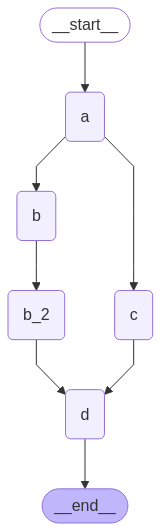
graph.invoke({"aggregate": []})Adding "A" to []
Adding "B" to ['A']
Adding "C" to ['A']
Adding "B_2" to ['A', 'B', 'C']
Adding "D" to ['A', 'B', 'C', 'B_2']In the above example, nodes "b" and "c" are executed concurrently in the same superstep. We set defer=True on node d so it will not execute until all pending tasks are finished. In this case, this means that "d" waits to execute until the entire "b" branch is finished.
When every branch always runs, you can wait with a list-form edge instead of defer=True. add_edge also accepts a list of start nodes. This is not shorthand for separate add_edge calls; the two forms behave differently:
builder.add_edge(["b_2", "c"], "d") # d runs once, after both b_2 and c complete- A list of start nodes runs
donce, after all of the listed nodes have completed. If one of them never runs (for example, a conditional edge does not select its branch),dnever runs and no error is raised. State updates from branches that did complete remain in the graph state, butddoes not consume them. - Separate edges run
donce per superstep in which any incoming branch completes. With branches of equal length, that is a single run; with branches of different lengths,druns more than once. - Separate edges with
defer=True(the pattern in the example above) rundonce, after every selected branch has completed, whether the fan-out selected all of the branches or only some of them.
defer=True postpones the node until no tasks are pending anywhere in the graph, not only in the branches that feed it. A Send addressed to the node still invokes it separately.
Conditional branching
If your fan-out should vary at runtime based on the state, you can use @[add_conditional_edges] to select one or more paths using the graph state. See example below, where node a generates a state update that determines the following node.
from typing import Annotated, Literal, Sequence
from typing_extensions import TypedDict
from langgraph.graph import StateGraph, START, END

class State(TypedDict):
    aggregate: Annotated[list, operator.add]
    # Add a key to the state. We will set this key to determine
    # how we branch.
    which: str

def a(state: State):
    print(f'Adding "A" to {state["aggregate"]}')
    return {"aggregate": ["A"], "which": "c"}  # [!code highlight]

def b(state: State):
    print(f'Adding "B" to {state["aggregate"]}')
    return {"aggregate": ["B"]}

def c(state: State):
    print(f'Adding "C" to {state["aggregate"]}')
    return {"aggregate": ["C"]}

builder = StateGraph(State)
builder.add_node(a)
builder.add_node(b)
builder.add_node(c)
builder.add_edge(START, "a")
builder.add_edge("b", END)
builder.add_edge("c", END)

def conditional_edge(state: State) -> Literal["b", "c"]:
    # Fill in arbitrary logic here that uses the state
    # to determine the next node
    return state["which"]

builder.add_conditional_edges("a", conditional_edge)  # [!code highlight]

graph = builder.compile()
from IPython.display import Image, display
display(Image(graph.get_graph().draw_mermaid_png()))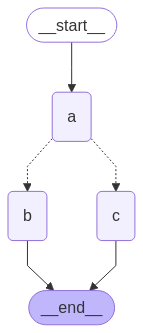
result = graph.invoke({"aggregate": []})
print(result)
Adding "A" to []
Adding "C" to ['A']
{'aggregate': ['A', 'C'], 'which': 'c'}Your conditional edges can route to multiple destination nodes. For example:
def route_bc_or_cd(state: State) -> Sequence[str]:
    if state["which"] == "cd":
        return ["c", "d"]
    return ["b", "c"]
Map-Reduce and the send API
LangGraph supports map-reduce and other advanced branching patterns using the Send API. Here is an example of how to use it:
from langgraph.graph import StateGraph, START, END
from langgraph.types import Send
from typing_extensions import TypedDict, Annotated

class OverallState(TypedDict):
    topic: str
    subjects: list[str]
    jokes: Annotated[list[str], operator.add]
    best_selected_joke: str

def generate_topics(state: OverallState):
    return {"subjects": ["lions", "elephants", "penguins"]}

def generate_joke(state: OverallState):
    joke_map = {
        "lions": "Why don't lions like fast food? Because they can't catch it!",
        "elephants": "Why don't elephants use computers? They're afraid of the mouse!",
        "penguins": "Why don't penguins like talking to strangers at parties? Because they find it hard to break the ice."
    }
    return {"jokes": [joke_map[state["subject"]]]}

def continue_to_jokes(state: OverallState):
    return [Send("generate_joke", {"subject": s}) for s in state["subjects"]]

def best_joke(state: OverallState):
    return {"best_selected_joke": "penguins"}

builder = StateGraph(OverallState)
builder.add_node("generate_topics", generate_topics)
builder.add_node("generate_joke", generate_joke)
builder.add_node("best_joke", best_joke)
builder.add_edge(START, "generate_topics")
builder.add_conditional_edges("generate_topics", continue_to_jokes, ["generate_joke"])
builder.add_edge("generate_joke", "best_joke")
builder.add_edge("best_joke", END)
graph = builder.compile()
from IPython.display import Image, display
display(Image(graph.get_graph().draw_mermaid_png()))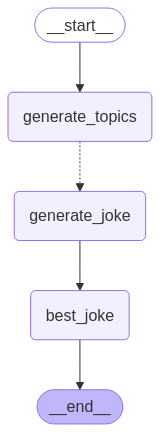
# Call the graph: here we call it to generate a list of jokes
stream = graph.stream_events({"topic": "animals"}, version="v3")
for message in stream.messages:
    for token in message.text:
        print(token, end="", flush=True)
{'generate_topics': {'subjects': ['lions', 'elephants', 'penguins']}}
{'generate_joke': {'jokes': ["Why don't lions like fast food? Because they can't catch it!"]}}
{'generate_joke': {'jokes': ["Why don't elephants use computers? They're afraid of the mouse!"]}}
{'generate_joke': {'jokes': ['Why don't penguins like talking to strangers at parties? Because they find it hard to break the ice.']}}
{'best_joke': {'best_selected_joke': 'penguins'}}Create and control loops
When creating a graph with a loop, we require a mechanism for terminating execution. This is most commonly done by adding a conditional edge (opens in a new tab) that routes to the END (opens in a new tab) node once we reach some termination condition.
You can also set the graph recursion limit when invoking or streaming the graph. The recursion limit sets the number of super-steps (opens in a new tab) that the graph is allowed to execute before it raises an error. Read more about the recursion limit concept (opens in a new tab).
Let's consider a simple graph with a loop to better understand how these mechanisms work.
To return the last value of your state instead of receiving a recursion limit error, see the next section.
When creating a loop, you can include a conditional edge that specifies a termination condition:
builder = StateGraph(State)
builder.add_node(a)
builder.add_node(b)

def route(state: State) -> Literal["b", END]:
    if termination_condition(state):
        return END
    else:
        return "b"

builder.add_edge(START, "a")
builder.add_conditional_edges("a", route)
builder.add_edge("b", "a")
graph = builder.compile()
To control the recursion limit, specify "recursion_limit" in the config. This will raise a GraphRecursionError, which you can catch and handle:
from langgraph.errors import GraphRecursionError

try:
    graph.invoke(inputs, {"recursion_limit": 3})
except GraphRecursionError:
    print("Recursion Error")
Let's define a graph with a simple loop. Note that we use a conditional edge to implement a termination condition.
from typing import Annotated, Literal
from typing_extensions import TypedDict
from langgraph.graph import StateGraph, START, END

class State(TypedDict):
    # The operator.add reducer fn makes this append-only
    aggregate: Annotated[list, operator.add]

def a(state: State):
    print(f'Node A sees {state["aggregate"]}')
    return {"aggregate": ["A"]}

def b(state: State):
    print(f'Node B sees {state["aggregate"]}')
    return {"aggregate": ["B"]}

# Define nodes
builder = StateGraph(State)
builder.add_node(a)
builder.add_node(b)

# Define edges
def route(state: State) -> Literal["b", END]:
    if len(state["aggregate"]) < 7:
        return "b"
    else:
        return END

builder.add_edge(START, "a")
builder.add_conditional_edges("a", route)
builder.add_edge("b", "a")
graph = builder.compile()
from IPython.display import Image, display
display(Image(graph.get_graph().draw_mermaid_png()))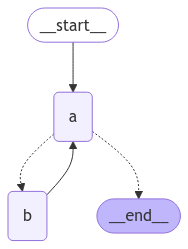
This architecture is similar to a ReAct agent (opens in a new tab) in which node "a" is a tool-calling model, and node "b" represents the tools.
In our route conditional edge, we specify that we should end after the "aggregate" list in the state passes a threshold length.
Invoking the graph, we see that we alternate between nodes "a" and "b" before terminating once we reach the termination condition.
graph.invoke({"aggregate": []})Node A sees []
Node B sees ['A']
Node A sees ['A', 'B']
Node B sees ['A', 'B', 'A']
Node A sees ['A', 'B', 'A', 'B']
Node B sees ['A', 'B', 'A', 'B', 'A']
Node A sees ['A', 'B', 'A', 'B', 'A', 'B']Impose a recursion limit
In some applications, we may not have a guarantee that we will reach a given termination condition. In these cases, we can set the graph's recursion limit (opens in a new tab). This will raise a GraphRecursionError after a given number of supersteps (opens in a new tab). We can then catch and handle this exception:
from langgraph.errors import GraphRecursionError

try:
    graph.invoke({"aggregate": []}, {"recursion_limit": 4})
except GraphRecursionError:
    print("Recursion Error")
Node A sees []
Node B sees ['A']
Node C sees ['A', 'B']
Node D sees ['A', 'B']
Node A sees ['A', 'B', 'C', 'D']
Recursion ErrorExtended example: return state on hitting recursion limit
Instead of raising GraphRecursionError, we can introduce a new key to the state that keeps track of the number of steps remaining until reaching the recursion limit. We can then use this key to determine if we should end the run.
LangGraph implements a special RemainingSteps annotation. Under the hood, it creates a ManagedValue channel -- a state channel that will exist for the duration of our graph run and no longer.
import operator
from typing import Annotated, Literal
from typing_extensions import TypedDict
from langgraph.graph import StateGraph, START, END
from langgraph.managed.is_last_step import RemainingSteps

class State(TypedDict):
    aggregate: Annotated[list, operator.add]
    remaining_steps: RemainingSteps

def a(state: State):
    print(f'Node A sees {state["aggregate"]}')
    return {"aggregate": ["A"]}

def b(state: State):
    print(f'Node B sees {state["aggregate"]}')
    return {"aggregate": ["B"]}

# Define nodes
builder = StateGraph(State)
builder.add_node(a)
builder.add_node(b)

# Define edges
def route(state: State) -> Literal["b", END]:
    if state["remaining_steps"] <= 2:
        return END
    else:
        return "b"

builder.add_edge(START, "a")
builder.add_conditional_edges("a", route)
builder.add_edge("b", "a")
graph = builder.compile()

# Test it out
result = graph.invoke({"aggregate": []}, {"recursion_limit": 4})
print(result)
Node A sees []
Node B sees ['A']
Node A sees ['A', 'B']
{'aggregate': ['A', 'B', 'A']}Extended example: loops with branches
To better understand how the recursion limit works, let's consider a more complex example. Below we implement a loop, but one step fans out into two nodes:
import operator
from typing import Annotated, Literal
from typing_extensions import TypedDict
from langgraph.graph import StateGraph, START, END

class State(TypedDict):
    aggregate: Annotated[list, operator.add]

def a(state: State):
    print(f'Node A sees {state["aggregate"]}')
    return {"aggregate": ["A"]}

def b(state: State):
    print(f'Node B sees {state["aggregate"]}')
    return {"aggregate": ["B"]}

def c(state: State):
    print(f'Node C sees {state["aggregate"]}')
    return {"aggregate": ["C"]}

def d(state: State):
    print(f'Node D sees {state["aggregate"]}')
    return {"aggregate": ["D"]}

# Define nodes
builder = StateGraph(State)
builder.add_node(a)
builder.add_node(b)
builder.add_node(c)
builder.add_node(d)

# Define edges
def route(state: State) -> Literal["b", END]:
    if len(state["aggregate"]) < 7:
        return "b"
    else:
        return END

builder.add_edge(START, "a")
builder.add_conditional_edges("a", route)
builder.add_edge("b", "c")
builder.add_edge("b", "d")
builder.add_edge(["c", "d"], "a")
graph = builder.compile()
from IPython.display import Image, display
display(Image(graph.get_graph().draw_mermaid_png()))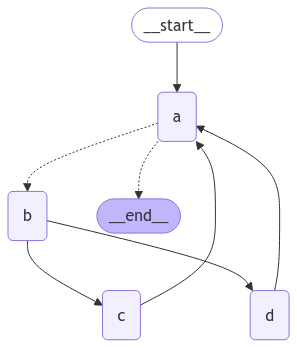
This graph looks complex, but can be conceptualized as loop of supersteps (opens in a new tab):
- Node A
- Node B
- Nodes C and D
- Node A
- ...
We have a loop of four supersteps, where nodes C and D are executed concurrently. The list-form edge waits for both "c" and "d" before returning to "a". For how list-form edges differ from separate edges into the same node, see Defer node execution.
Invoking the graph as before, we see that we complete two full "laps" before hitting the termination condition:
result = graph.invoke({"aggregate": []})Node A sees []
Node B sees ['A']
Node D sees ['A', 'B']
Node C sees ['A', 'B']
Node A sees ['A', 'B', 'C', 'D']
Node B sees ['A', 'B', 'C', 'D', 'A']
Node D sees ['A', 'B', 'C', 'D', 'A', 'B']
Node C sees ['A', 'B', 'C', 'D', 'A', 'B']
Node A sees ['A', 'B', 'C', 'D', 'A', 'B', 'C', 'D']However, if we set the recursion limit to four, we only complete one lap because each lap is four supersteps:
from langgraph.errors import GraphRecursionError

try:
    result = graph.invoke({"aggregate": []}, {"recursion_limit": 4})
except GraphRecursionError:
    print("Recursion Error")
Node A sees []
Node B sees ['A']
Node C sees ['A', 'B']
Node D sees ['A', 'B']
Node A sees ['A', 'B', 'C', 'D']
Recursion ErrorAsync
Using the async programming paradigm can produce significant performance improvements when running IO-bound (opens in a new tab) code concurrently (e.g., making concurrent API requests to a chat model provider).
To convert a sync implementation of the graph to an async implementation, you will need to:
- Update
nodesuseasync definstead ofdef. - Update the code inside to use
awaitappropriately. - Invoke the graph with
.ainvokeor.astreamas desired.
Because many LangChain objects implement the Runnable Protocol (opens in a new tab) which has async variants of all the sync methods it's typically fairly quick to upgrade a sync graph to an async graph.
See example below. To demonstrate async invocations of underlying LLMs, we will include a chat model:
from langchain.chat_models import init_chat_model
from langgraph.graph import MessagesState, StateGraph

async def node(state: MessagesState):  # [!code highlight]
    new_message = await llm.ainvoke(state["messages"])  # [!code highlight]
    return {"messages": [new_message]}

builder = StateGraph(MessagesState).add_node(node).set_entry_point("node")
graph = builder.compile()

input_message = {"role": "user", "content": "Hello"}
result = await graph.ainvoke({"messages": [input_message]})  # [!code highlight]
Async streaming See the streaming guide (opens in a new tab) for examples of streaming with async.
Combine control flow and state updates with Command
It can be useful to combine control flow (edges) and state updates (nodes). For example, you might want to BOTH perform state updates AND decide which node to go to next in the SAME node. LangGraph provides a way to do so by returning a @[Command] object from node functions:
def my_node(state: State) -> Command[Literal["my_other_node"]]:
    return Command(
        # state update
        update={"foo": "bar"},
        # control flow
        goto="my_other_node"
    )
We show an end-to-end example below. Let's create a simple graph with 3 nodes: A, B and C. We will first execute node A, and then decide whether to go to Node B or Node C next based on the output of node A.
from typing_extensions import TypedDict, Literal
from langgraph.graph import StateGraph, START
from langgraph.types import Command

# Define graph state
class State(TypedDict):
    foo: str

# Define the nodes

def node_a(state: State) -> Command[Literal["node_b", "node_c"]]:
    print("Called A")
    value = random.choice(["b", "c"])
    # this is a replacement for a conditional edge function
    if value == "b":
        goto = "node_b"
    else:
        goto = "node_c"

    # note how Command allows you to BOTH update the graph state AND route to the next node
    return Command(
        # this is the state update
        update={"foo": value},
        # this is a replacement for an edge
        goto=goto,
    )

def node_b(state: State):
    print("Called B")
    return {"foo": state["foo"] + "b"}

def node_c(state: State):
    print("Called C")
    return {"foo": state["foo"] + "c"}
We can now create the @[StateGraph] with the above nodes. Notice that the graph doesn't have conditional edges (opens in a new tab) for routing! This is because control flow is defined with @[Command] inside node_a.
builder = StateGraph(State)
builder.add_edge(START, "node_a")
builder.add_node(node_a)
builder.add_node(node_b)
builder.add_node(node_c)
# NOTE: there are no edges between nodes A, B and C!

graph = builder.compile()
You might have noticed that we used @[
Command] as a return type annotation, e.g.Command[Literal["node_b", "node_c"]]. This is necessary for the graph rendering and tells LangGraph thatnode_acan navigate tonode_bandnode_c.
from IPython.display import display, Image

display(Image(graph.get_graph().draw_mermaid_png()))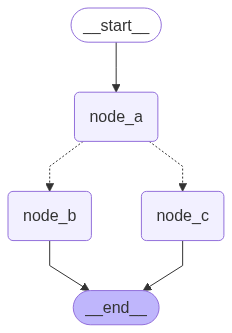
If we run the graph multiple times, we'd see it take different paths (A -> B or A -> C) based on the random choice in node A.
graph.invoke({"foo": ""})Called A
Called CNavigate to a node in a parent graph
If you are using subgraphs (opens in a new tab), you might want to navigate from a node within a subgraph to a different subgraph (i.e. a different node in the parent graph). To do so, you can specify graph=Command.PARENT in Command:
def my_node(state: State) -> Command[Literal["other_subgraph"]]:
    return Command(
        update={"foo": "bar"},
        goto="other_subgraph",  # where `other_subgraph` is a node in the parent graph
        graph=Command.PARENT
    )
Let's demonstrate this using the above example. We'll do so by changing nodeA in the above example into a single-node graph that we'll add as a subgraph to our parent graph.
State updates with
Command.PARENTWhen you send updates from a subgraph node to a parent graph node for a key that's shared by both parent and subgraph state schemas (opens in a new tab), you must define a reducer (opens in a new tab) for the key you're updating in the parent graph state. See the example below.
from typing_extensions import Annotated

class State(TypedDict):
    # NOTE: we define a reducer here
    foo: Annotated[str, operator.add]  # [!code highlight]

def node_a(state: State):
    print("Called A")
    value = random.choice(["a", "b"])
    # this is a replacement for a conditional edge function
    if value == "a":
        goto = "node_b"
    else:
        goto = "node_c"

    # note how Command allows you to BOTH update the graph state AND route to the next node
    return Command(
        update={"foo": value},
        goto=goto,
        # this tells LangGraph to navigate to node_b or node_c in the parent graph
        # NOTE: this will navigate to the closest parent graph relative to the subgraph
        graph=Command.PARENT,  # [!code highlight]
    )

subgraph = StateGraph(State).add_node(node_a).add_edge(START, "node_a").compile()

def node_b(state: State):
    print("Called B")
    # NOTE: since we've defined a reducer, we don't need to manually append
    # new characters to existing 'foo' value. instead, reducer will append these
    # automatically (via operator.add)
    return {"foo": "b"}  # [!code highlight]

def node_c(state: State):
    print("Called C")
    return {"foo": "c"}  # [!code highlight]

builder = StateGraph(State)
builder.add_edge(START, "subgraph")
builder.add_node("subgraph", subgraph)
builder.add_node(node_b)
builder.add_node(node_c)

graph = builder.compile()graph.invoke({"foo": ""})Called A
Called CUse inside tools
A common use case is updating graph state from inside a tool. For example, in a customer support application you might want to look up customer information based on their account number or ID in the beginning of the conversation. To update the graph state from the tool, you can return Command(update={"my_custom_key": "foo", "messages": [...]}) from the tool:
from langchain.tools import ToolRuntime

@tool
def lookup_user_info(runtime: ToolRuntime):
    """Use this to look up user information to better assist them with their questions."""
    user_info = get_user_info(runtime.server_info.user.identity)  # [!code highlight]
    return Command(
        update={
            # update the state keys
            "user_info": user_info,
            # update the message history
            "messages": [ToolMessage("Successfully looked up user information", tool_call_id=runtime.tool_call_id)]
        }
    )
You MUST include
messages(or any state key used for the message history) inCommand.updatewhen returning @[Command] from a tool and the list of messages inmessagesMUST contain aToolMessage. This is necessary for the resulting message history to be valid (LLM providers require AI messages with tool calls to be followed by the tool result messages).
If you are using tools that update state via @[Command], we recommend using prebuilt @[ToolNode] which automatically handles tools returning @[Command] objects and propagates them to the graph state. If you're writing a custom node that calls tools, you would need to manually propagate @[Command] objects returned by the tools as the update from the node.
Visualize your graph
Here we demonstrate how to visualize the graphs you create.
You can visualize any arbitrary Graph (opens in a new tab), including @[StateGraph].
Let's have some fun by drawing fractals :).
from typing import Annotated, Literal
from typing_extensions import TypedDict
from langgraph.graph import StateGraph, START, END
from langgraph.graph.message import add_messages

class State(TypedDict):
    messages: Annotated[list, add_messages]

class MyNode:
    def __init__(self, name: str):
        self.name = name
    def __call__(self, state: State):
        return {"messages": [("assistant", f"Called node {self.name}")]}

def route(state) -> Literal["entry_node", END]:
    if len(state["messages"]) > 10:
        return END
    return "entry_node"

def add_fractal_nodes(builder, current_node, level, max_level):
    if level > max_level:
        return
    # Number of nodes to create at this level
    num_nodes = random.randint(1, 3)  # Adjust randomness as needed
    for i in range(num_nodes):
        nm = ["A", "B", "C"][i]
        node_name = f"node_{current_node}_{nm}"
        builder.add_node(node_name, MyNode(node_name))
        builder.add_edge(current_node, node_name)
        # Recursively add more nodes
        r = random.random()
        if r > 0.2 and level + 1 < max_level:
            add_fractal_nodes(builder, node_name, level + 1, max_level)
        elif r > 0.05:
            builder.add_conditional_edges(node_name, route, node_name)
        else:
            # End
            builder.add_edge(node_name, END)

def build_fractal_graph(max_level: int):
    builder = StateGraph(State)
    entry_point = "entry_node"
    builder.add_node(entry_point, MyNode(entry_point))
    builder.add_edge(START, entry_point)
    add_fractal_nodes(builder, entry_point, 1, max_level)
    # Optional: set a finish point if required
    builder.add_edge(entry_point, END)  # or any specific node
    return builder.compile()

app = build_fractal_graph(3)
Mermaid
We can also convert a graph class into Mermaid syntax.
print(app.get_graph().draw_mermaid())%%{init: {'flowchart': {'curve': 'linear'}}}%%
graph TD;
tart__([<p>__start__</p>]):::first
ry_node(entry_node)
e_entry_node_A(node_entry_node_A)
e_entry_node_B(node_entry_node_B)
e_node_entry_node_B_A(node_node_entry_node_B_A)
e_node_entry_node_B_B(node_node_entry_node_B_B)
e_node_entry_node_B_C(node_node_entry_node_B_C)
nd__([<p>__end__</p>]):::last
tart__ --> entry_node;
ry_node --> __end__;
ry_node --> node_entry_node_A;
ry_node --> node_entry_node_B;
e_entry_node_B --> node_node_entry_node_B_A;
e_entry_node_B --> node_node_entry_node_B_B;
e_entry_node_B --> node_node_entry_node_B_C;
e_entry_node_A -.-> entry_node;
e_entry_node_A -.-> __end__;
e_node_entry_node_B_A -.-> entry_node;
e_node_entry_node_B_A -.-> __end__;
e_node_entry_node_B_B -.-> entry_node;
e_node_entry_node_B_B -.-> __end__;
e_node_entry_node_B_C -.-> entry_node;
e_node_entry_node_B_C -.-> __end__;
ssDef default fill:#f2f0ff,line-height:1.2
ssDef first fill-opacity:0
ssDef last fill:#bfb6fcPNG
If preferred, we could render the Graph into a .png. Here we could use three options:
- Using Mermaid.ink API (does not require additional packages)
- Using Mermaid + Pyppeteer (requires
pip install pyppeteer) - Using graphviz (which requires
pip install graphviz)
Using Mermaid.Ink
By default, draw_mermaid_png() uses Mermaid.Ink's API to generate the diagram.
from IPython.display import Image, display
from langchain_core.runnables.graph import CurveStyle, MermaidDrawMethod, NodeStyles

display(Image(app.get_graph().draw_mermaid_png()))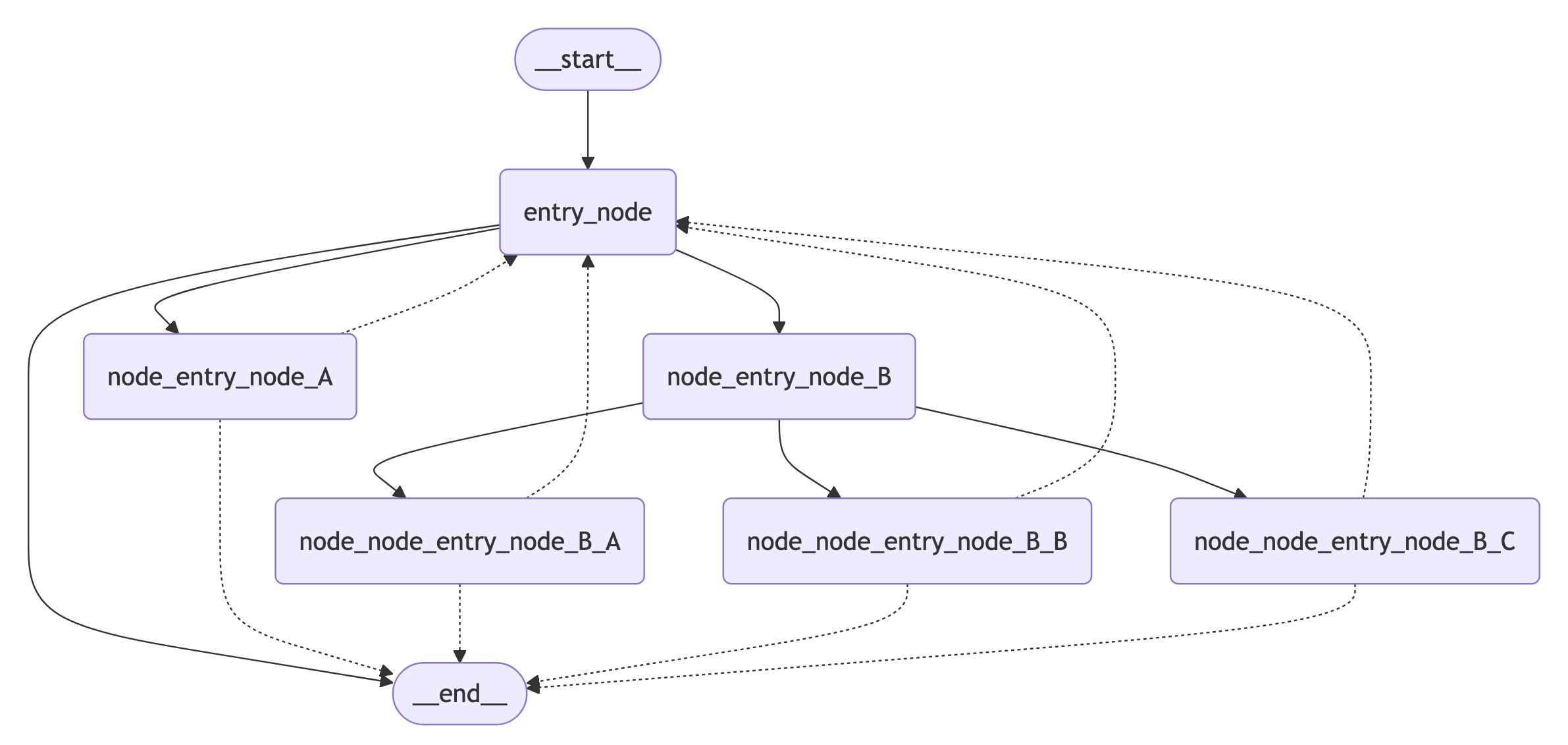
Using Mermaid + Pyppeteer
nest_asyncio.apply()  # Required for Jupyter Notebook to run async functions

display(
    Image(
        app.get_graph().draw_mermaid_png(
            curve_style=CurveStyle.LINEAR,
            node_colors=NodeStyles(first="#ffdfba", last="#baffc9", default="#fad7de"),
            wrap_label_n_words=9,
            output_file_path=None,
            draw_method=MermaidDrawMethod.PYPPETEER,
            background_color="white",
            padding=10,
        )
    )
)
Using Graphviz
try:
    display(Image(app.get_graph().draw_png()))
except ImportError:
    print(
        "You likely need to install dependencies for pygraphviz, see more here https://github.com/pygraphviz/pygraphviz/blob/main/INSTALL.txt"
    )