Interrupts
Interrupts allow you to pause graph execution at specific points and wait for external input before continuing. This enables human-in-the-loop patterns where you need external input to proceed. When an interrupt is triggered, LangGraph saves the graph state using its persistence (opens in a new tab) layer and waits indefinitely until you resume execution.
Interrupts work by calling the interrupt() function at any point in your graph nodes. The function accepts any JSON-serializable value which is surfaced to the caller. When you're ready to continue, you resume execution by re-invoking the graph using Command, which then becomes the return value of the interrupt() call from inside the node.
Unlike static breakpoints (which pause before or after specific nodes), interrupts are dynamic: they can be placed anywhere in your code and can be conditional based on your application logic.
- Checkpointing keeps your place: the checkpointer writes the exact graph state so you can resume later, even when in an error state.
thread_idis your pointer: setconfig={"configurable": {"thread_id": ...}}to tell the checkpointer which state to load.- Interrupt payloads surface via
stream.interrupts: when using event streaming (opens in a new tab) (graph.stream_events(..., version="v3")), the values you pass tointerrupt()appear onstream.interrupts, andstream.interruptedisTruewhen the run pauses for input.
The thread_id you choose is effectively your persistent cursor. Reusing it resumes the same checkpoint; using a new value starts a brand-new thread with an empty state.
Pause using interrupt
The @[interrupt] function pauses graph execution and returns a value to the caller. When you call @[interrupt] within a node, LangGraph saves the current graph state and waits for you to resume execution with input.
To use @[interrupt], you need:
- A checkpointer to persist the graph state (use a durable checkpointer in production)
- A thread ID in your config so the runtime knows which state to resume from
- To call
interrupt()where you want to pause (payload must be JSON-serializable)
from langgraph.types import interrupt

def approval_node(state: State):
    # Pause and ask for approval
    approved = interrupt("Do you approve this action?")

    # When you resume, Command(resume=...) returns that value here
    return {"approved": approved}
When you call @[interrupt], here's what happens:
- Graph execution gets suspended at the exact point where @[
interrupt] is called - State is saved using the checkpointer so execution can be resumed later, In production, this should be a persistent checkpointer (e.g. backed by a database)
- Value is returned to the caller on
stream.interruptswhen using event streaming (opens in a new tab) (graph.stream_events(..., version="v3")), or under__interrupt__with the defaultinvoke()API; it can be any JSON-serializable value (string, object, array, etc.) - Graph waits indefinitely until you resume execution with a response
- Response is passed back into the node when you resume, becoming the return value of the
interrupt()call
Resuming interrupts
After an interrupt pauses execution, you resume the graph by invoking it again with a Command that contains the resume value. The resume value is passed back to the interrupt call, allowing the node to continue execution with the external input.
The recommended way to drive a graph that may interrupt is event streaming (opens in a new tab) — it surfaces interrupts via stream.interrupts and stream.interrupted, and exposes the final state through stream.output.
The default
graph.invoke(...)API still works and surfaces interrupts underresult["__interrupt__"]. Use it when you don't need streamed projections; otherwise prefergraph.stream_events(..., version="v3").
Key points about resuming:
- You must use the same thread ID when resuming that was used when the interrupt occurred
- The value passed to
Command(resume=...)becomes the return value of the @[interrupt] call - The node restarts from the beginning of the node where the @[
interrupt] was called when resumed, so any code before the @[interrupt] runs again - You can pass any JSON-serializable value as the resume value, subject to validation when you specify a typed
response_schema
Command(resume=...)is the onlyCommandpattern intended as input toinvoke()/stream()/stream_events(). The otherCommandparameters (update,goto,graph) are designed for returning from node functions (opens in a new tab). Do not passCommand(update=...)as input to continue multi-turn conversations—pass a plain input dict instead.
Define an interrupt response schema
The response_schema argument to @[interrupt] describes the input expected when you resume the graph. Clients can use the schema to render typed input forms.
Interrupt response schemas require
langgraph>=1.2.12.
Pass a Pydantic model class, a TypedDict from typing_extensions, or a dataclass to validate resume values. LangGraph converts the type to JSON Schema and includes it in Interrupt.response_schema, separately from the interrupt's value payload. The schema is available on interrupts returned to the caller and in checkpoint task interrupts.
This example uses the approval schema from LangGraph's interrupt tests:
from typing import Any

from pydantic import BaseModel
from typing_extensions import TypedDict

from langgraph.checkpoint.memory import InMemorySaver
from langgraph.graph import START, StateGraph
from langgraph.types import Command, interrupt


class Decision(BaseModel):
    approved: bool
    note: str | None = None


class State(TypedDict):
    answer: Any


def node(state: State) -> State:
    answer = interrupt({"question": "approve?"}, response_schema=Decision)
    return {"answer": answer}


graph = (
    StateGraph(State)
    .add_node("node", node)
    .add_edge(START, "node")
    .compile(checkpointer=InMemorySaver())
)
config = {"configurable": {"thread_id": "1"}}

result = graph.invoke({"answer": None}, config)
pending = result["__interrupt__"][0]
assert pending.response_schema == Decision.model_json_schema()

result = graph.invoke(Command(resume={"approved": True}), config)
assert result["answer"] == Decision(approved=True)
With a typed schema, interrupt() returns the validated object: a Pydantic model instance, a dictionary for a TypedDict, or a dataclass instance. Pydantic's validation and coercion rules apply. Invalid input raises pydantic.ValidationError; you can retry with a corrected Command(resume=...) using the same thread ID.
You can also pass a JSON Schema dictionary as response_schema. LangGraph exposes that dictionary unchanged but does not validate resume values against it. When you omit response_schema, its value is None, and resume values pass through without schema validation.
Studio renders interrupt response schemas as typed input fields instead of a JSON editor. This preview of the Studio component uses example data with approval, note, and numeric amount fields.

Common patterns
The key thing that interrupts unlock is the ability to pause execution and wait for external input. This is useful for a variety of use cases, including:
- Approval workflows: Pause before executing critical actions (API calls, database changes, financial transactions)
- Handling multiple interrupts: Pair interrupt IDs with resume values when resuming multiple interrupts in a single invocation
- Review and edit: Let humans review and modify LLM outputs or tool calls before continuing
- Interrupting tool calls: Pause before executing tool calls to review and edit the tool call before execution
- Validating human input: Pause before proceeding to the next step to validate human input
Stream with human-in-the-loop (HITL) interrupts
When building interactive agents with human-in-the-loop workflows, you can use event streaming (opens in a new tab) to consume message chunks and state snapshots concurrently while handling interrupts.
Use the typed projections returned by graph.stream_events(..., version="v3") in a loop until the run finishes:
-
Stream AI responses token-by-token via
stream.messages -
Observe per-step state snapshots via
stream.values -
Detect interrupts via
stream.interruptedand read their payloads fromstream.interrupts -
Resume execution by calling
stream_eventsagain withCommand(resume=...)and repeat untilstream.interruptedis false -
stream.messages: Chat-model output as content blocks; iterate eachmessage.textfor token deltas. For nested subgraphs, read message chunks fromstream.subgraphs[*].messages. -
stream.values: Full state snapshots after each step -
stream.interrupted/stream.interrupts: After each run, check whether the graph paused; read payloads fromstream.interrupts -
Command(resume=...): Pass as the nextstream_eventsinput to resume; loop until the run completes without interrupting
Handling multiple interrupts
When parallel branches interrupt simultaneously (for example, fan-out to multiple nodes that each call interrupt()), you may need to resume multiple interrupts in a single invocation.
When resuming multiple interrupts with a single invocation, map each interrupt ID to its resume value.
This ensures each response is paired with the correct interrupt at runtime.
Approve or reject
One of the most common uses of interrupts is to pause before a critical action and ask for approval. For example, you might want to ask a human to approve an API call, a database change, or any other important decision.
from typing import Literal
from langgraph.types import interrupt, Command

def approval_node(state: State) -> Command[Literal["proceed", "cancel"]]:
    # Pause execution; payload shows up on stream.interrupts (with stream_events) or result["__interrupt__"] (with invoke)
    is_approved = interrupt({
        "question": "Do you want to proceed with this action?",
        "details": state["action_details"]
    })

    # Route based on the response
    if is_approved:
        return Command(goto="proceed")  # Runs after the resume payload is provided
    else:
        return Command(goto="cancel")
When you resume the graph, pass True to approve or False to reject:
# To approve
graph.stream_events(Command(resume=True), config=config, version="v3").output

# To reject
graph.stream_events(Command(resume=False), config=config, version="v3").output
Full example
:::python


:::

:::js

```typescript
import {
  Command,
  MemorySaver,
  START,
  END,
  StateGraph,
  StateSchema,
  interrupt,
} from "@langchain/langgraph";
import * as z from "zod";

const State = new StateSchema({
  actionDetails: z.string(),
  status: z.enum(["pending", "approved", "rejected"]).nullable(),
});

const graphBuilder = new StateGraph(State)
  .addNode("approval", async (state) => {
    // Expose details so the caller can render them in a UI
    const decision = interrupt({
      question: "Approve this action?",
      details: state.actionDetails,
    });
    return new Command({ goto: decision ? "proceed" : "cancel" });
  }, { ends: ['proceed', 'cancel'] })
  .addNode("proceed", () => ({ status: "approved" }))
  .addNode("cancel", () => ({ status: "rejected" }))
  .addEdge(START, "approval")
  .addEdge("proceed", END)
  .addEdge("cancel", END);

// Use a more durable checkpointer in production
const checkpointer = new MemorySaver();
const graph = graphBuilder.compile({ checkpointer });

const config = { configurable: { thread_id: "approval-123" } };
const initial = await graph.invoke(
  { actionDetails: "Transfer $500", status: "pending" },
  config,
);
console.log(initial.__interrupt__);
// [{ value: { question: ..., details: ... } }]

// Resume with the decision; true routes to proceed, false to cancel
const resumed = await graph.invoke(new Command({ resume: true }), config);
console.log(resumed.status); // -> "approved"
```
:::
Review and edit state
Sometimes you want to let a human review and edit part of the graph state before continuing. This is useful for correcting LLMs, adding missing information, or making adjustments.
from langgraph.types import interrupt

def review_node(state: State):
    # Pause and show the current content for review (payload surfaces on stream.interrupts)
    edited_content = interrupt({
        "instruction": "Review and edit this content",
        "content": state["generated_text"]
    })

    # Update the state with the edited version
    return {"generated_text": edited_content}
When resuming, provide the edited content:
graph.stream_events(
    Command(resume="The edited and improved text"),  # Value becomes the return from interrupt()
    config=config,
    version="v3",
).output
Full example
:::python


:::

:::js

```typescript
import {
  Command,
  MemorySaver,
  START,
  END,
  StateGraph,
  StateSchema,
  interrupt,
} from "@langchain/langgraph";
import * as z from "zod";

const State = new StateSchema({
  generatedText: z.string(),
});

const builder = new StateGraph(State)
  .addNode("review", async (state) => {
    // Ask a reviewer to edit the generated content
    const updated = interrupt({
      instruction: "Review and edit this content",
      content: state.generatedText,
    });
    return { generatedText: updated };
  })
  .addEdge(START, "review")
  .addEdge("review", END);

const checkpointer = new MemorySaver();
const graph = builder.compile({ checkpointer });

const config = { configurable: { thread_id: "review-42" } };
const initial = await graph.invoke({ generatedText: "Initial draft" }, config);
console.log(initial.__interrupt__);
// [{ value: { instruction: ..., content: ... } }]

// Resume with the edited text from the reviewer
const finalState = await graph.invoke(
  new Command({ resume: "Improved draft after review" }),
  config,
);
console.log(finalState.generatedText); // -> "Improved draft after review"
```
:::
Interrupts in tools
You can also place interrupts directly inside tool functions. This makes the tool itself pause for approval whenever it's called, and allows for human review and editing of the tool call before it is executed.
First, define a tool that uses @[interrupt]:
from langchain.tools import tool
from langgraph.types import interrupt

@tool
def send_email(to: str, subject: str, body: str):
    """Send an email to a recipient."""

    # Pause before sending; payload surfaces on stream.interrupts when using event streaming
    response = interrupt({
        "action": "send_email",
        "to": to,
        "subject": subject,
        "body": body,
        "message": "Approve sending this email?"
    })

    if response.get("action") == "approve":
        # Resume value can override inputs before executing
        final_to = response.get("to", to)
        final_subject = response.get("subject", subject)
        final_body = response.get("body", body)
        return f"Email sent to {final_to} with subject '{final_subject}'"
    return "Email cancelled by user"
This approach is useful when you want the approval logic to live with the tool itself, making it reusable across different parts of your graph. The LLM can call the tool naturally, and the interrupt will pause execution whenever the tool is invoked, allowing you to approve, edit, or cancel the action.
Full example
:::python

```python
import sqlite3
import operator
from typing import TypedDict, Annotated, Literal
from langchain.tools import tool
from langchain_anthropic import ChatAnthropic
from langgraph.checkpoint.sqlite import SqliteSaver
from langgraph.graph import StateGraph, START, END
from langgraph.types import Command, interrupt
from langchain.messages import AnyMessage, SystemMessage, ToolMessage


class AgentState(TypedDict):
    messages: Annotated[list[AnyMessage], operator.add]


@tool
def send_email(to: str, subject: str, body: str):
    """Send an email to a recipient."""

    # Pause before sending; payload surfaces on stream.interrupts when using event streaming
    response = interrupt({
        "action": "send_email",
        "to": to,
        "subject": subject,
        "body": body,
        "message": "Approve sending this email?",
    })

    if response.get("action") == "approve":
        final_to = response.get("to", to)
        final_subject = response.get("subject", subject)
        final_body = response.get("body", body)

        # Actually send the email (your implementation here)
        print(f"[send_email] to={final_to} subject={final_subject} body={final_body}")
        return f"Email sent to {final_to}"

    return "Email cancelled by user"


model = ChatAnthropic(model="claude-sonnet-4-6").bind_tools([send_email])
tools_by_name = {"send_email": send_email}


def agent_node(state: AgentState):
    # LLM may decide to call the tool; interrupt pauses before sending
    result = model.invoke(state["messages"])
    return {"messages": [result]}

def tool_node(state: AgentState):
    """Performs the tool call"""
    result = []
    for tool_call in state["messages"][-1].tool_calls:
        tool = tools_by_name[tool_call["name"]]
        observation = tool.invoke(tool_call["args"])
        result.append(ToolMessage(content=observation, tool_call_id=tool_call["id"]))
    return {"messages": result}

def should_continue(state: AgentState) -> Literal["tool_node", END]:
    """Decide if we should continue the loop or stop based upon whether the LLM made a tool call"""
    messages = state["messages"]
    last_message = messages[-1]

    if last_message.tool_calls:
        return "tool_node"
    return END

builder = StateGraph(AgentState)
builder.add_node("agent", agent_node)
builder.add_node("tool_node", tool_node)

builder.add_edge(START, "agent")
builder.add_conditional_edges("agent", should_continue, ["tool_node", END])  # Routes to "tools" or END
builder.add_edge("tool_node", "agent")  # Loop back after tools

checkpointer = SqliteSaver(
    sqlite3.connect("tool-approval.db", check_same_thread=False)
)
graph = builder.compile(checkpointer=checkpointer)

config = {"configurable": {"thread_id": "email-workflow"}}
initial = graph.stream_events(
    {
        "messages": [
            {"role": "user", "content": "Send an email to [email protected] about the meeting"}
        ]
    },
    config=config,
    version="v3",
)
initial.output  # drive the stream to completion
print(initial.interrupts)  # -> (Interrupt(value={'action': 'send_email', ...}),)

# Resume with approval and optionally edited arguments
resumed = graph.stream_events(
    Command(resume={"action": "approve", "subject": "Updated subject"}),
    config=config,
    version="v3",
)
print(resumed.output["messages"][-1])  # -> Tool result returned by send_email
```
:::

:::js

```typescript
import { tool } from "@langchain/core/tools";
import { ChatAnthropic } from "@langchain/anthropic";
import {
  Command,
  MemorySaver,
  START,
  END,
  StateGraph,
  StateSchema,
  MessagesValue,
  GraphNode,
  interrupt,
} from "@langchain/langgraph";
import * as z from "zod";

const sendEmailTool = tool(
  async ({ to, subject, body }) => {
    // Pause before sending; payload surfaces in result.__interrupt__
    const response = interrupt({
      action: "send_email",
      to,
      subject,
      body,
      message: "Approve sending this email?",
    });

    if (response?.action === "approve") {
      const finalTo = response.to ?? to;
      const finalSubject = response.subject ?? subject;
      const finalBody = response.body ?? body;
      console.log("[sendEmailTool]", finalTo, finalSubject, finalBody);
      return `Email sent to ${finalTo}`;
    }
    return "Email cancelled by user";
  },
  {
    name: "send_email",
    description: "Send an email to a recipient",
    schema: z.object({
      to: z.string(),
      subject: z.string(),
      body: z.string(),
    }),
  },
);

const model = new ChatAnthropic({ model: "claude-sonnet-4-6" }).bindTools([sendEmailTool]);

const State = new StateSchema({
  messages: MessagesValue,
});

const agent: typeof State.Node = async (state) => {
  // LLM may decide to call the tool; interrupt pauses before sending
  const response = await model.invoke(state.messages);
  return { messages: [response] };
};

const graphBuilder = new StateGraph(State)
  .addNode("agent", agent)
  .addEdge(START, "agent")
  .addEdge("agent", END);

const checkpointer = new MemorySaver();
const graph = graphBuilder.compile({ checkpointer });

const config = { configurable: { thread_id: "email-workflow" } };
const initial = await graph.invoke(
  {
    messages: [
      { role: "user", content: "Send an email to [email protected] about the meeting" },
    ],
  },
  config,
);
console.log(initial.__interrupt__); // -> [{ value: { action: 'send_email', ... } }]

// Resume with approval and optionally edited arguments
const resumed = await graph.invoke(
  new Command({
    resume: { action: "approve", subject: "Updated subject" },
  }),
  config,
);
console.log(resumed.messages.at(-1)); // -> Tool result returned by send_email
```
:::
Validating human input
Sometimes you need to validate input from humans and re-prompt if the value is invalid. The recommended approach is to call interrupt() once per node invocation, return from the node with the error message stored in state, and use a conditional edge to loop back to the node until a valid value is provided.
Avoid
while True+interrupt()loops inside a single node. Because the node re-runs from the beginning on every resume (see Rules of interrupts), a loop that callsinterrupt()multiple times causes each resume to replay all previous iterations: the first resume replays 1 iteration, the second replays 2, and so on. The result is exponential re-execution of any code inside the loop body.
The correct pattern:
- Store the re-prompt question in state (e.g.
pending_question). - In the node, call
interrupt()exactly once, passing the current question from state. - If the answer is invalid, return the updated
pending_questionso the next invocation re-prompts. - Use
add_conditional_edgesto route back to the node until a valid value is collected.
Each resume invokes get_age_node exactly once, runs the interrupt() call once, and exits. When the answer is invalid, the conditional edge loops back and the next interrupt re-prompts with the updated question. No code runs more than once per resume.
Full example
:::python


:::

:::js

```typescript
import {
  Command,
  MemorySaver,
  START,
  END,
  StateGraph,
  StateSchema,
  interrupt,
} from "@langchain/langgraph";
import * as z from "zod";

const State = new StateSchema({
  age: z.number().nullable(),
  pendingQuestion: z.string().nullable(),
});

const builder = new StateGraph(State)
  .addNode("collectAge", (state) => {
    const question = state.pendingQuestion ?? "What is your age?";
    const answer = interrupt(question); // called exactly once per invocation

    if (typeof answer === "number" && answer > 0) {
      return { age: answer, pendingQuestion: null };
    }
    return { pendingQuestion: `'${answer}' is not a valid age. Please enter a positive number.` };
  })
  .addEdge(START, "collectAge")
  .addConditionalEdges("collectAge", (state) =>
    state.age !== null ? END : "collectAge"
  );

const checkpointer = new MemorySaver();
const graph = builder.compile({ checkpointer });

const config = { configurable: { thread_id: "form-1" } };
const first = await graph.invoke({ age: null, pendingQuestion: null }, config);
console.log(first.__interrupt__); // -> [{ value: "What is your age?", ... }]

// Provide invalid data; the node re-prompts via the conditional edge
const retry = await graph.invoke(new Command({ resume: "thirty" }), config);
console.log(retry.__interrupt__); // -> [{ value: "'thirty' is not a valid age...", ... }]

// Provide valid data; route returns END and the graph finishes
const final = await graph.invoke(new Command({ resume: 30 }), config);
console.log(final.age); // -> 30
```
:::
Rules of interrupts
When you call @[interrupt] within a node, LangGraph suspends execution by raising an exception that signals the runtime to pause. This exception propagates up through the call stack and is caught by the runtime, which notifies the graph to save the current state and wait for external input.
When execution resumes (after you provide the requested input), the runtime restarts the entire node from the beginning—it does not resume from the exact line where @[interrupt] was called. This means any code that ran before the @[interrupt] will execute again. Because of this, there's a few important rules to follow when working with interrupts to ensure they behave as expected.
Do not wrap interrupt calls in try/except
The way that @[interrupt] pauses execution at the point of the call is by throwing a special exception. If you wrap the @[interrupt] call in a try/except block, you will catch this exception and the interrupt will not be passed back to the graph.
- ✅ Separate @[
interrupt] calls from error-prone code - ✅ Use specific exception types in try/except blocks
def node_a(state: State):
# ✅ Good: interrupting first, then handling
# error conditions separately
interrupt("What's your name?")
try:
    fetch_data()  # This can fail
except Exception as e:
    print(e)
return state
Explicit exception handling
def node_a(state: State):
# ✅ Good: catching specific exception types
# will not catch the interrupt exception
try:
    name = interrupt("What's your name?")
    fetch_data()  # This can fail
except NetworkException as e:
    print(e)
return state- 🔴 Do not wrap @[
interrupt] calls in bare try/except blocks
def node_a(state: State):
    # ❌ Bad: wrapping interrupt in bare try/except
    # will catch the interrupt exception
    try:
        interrupt("What's your name?")
    except Exception as e:
        print(e)
    return state
Do not reorder interrupt calls within a node
It's common to use multiple interrupts in a single node, however this can lead to unexpected behavior if not handled carefully.
When a node contains multiple interrupt calls, LangGraph keeps a list of resume values specific to the task executing the node. Whenever execution resumes, it starts at the beginning of the node. For each interrupt encountered, LangGraph checks if a matching value exists in the task's resume list. Matching is strictly index-based, so the order of interrupt calls within the node is important.
- ✅ Keep @[
interrupt] calls consistent across node executions
def node_a(state: State):
    # ✅ Good: interrupt calls happen in the same order every time
    name = interrupt("What's your name?")
    age = interrupt("What's your age?")
    city = interrupt("What's your city?")

    return {
        "name": name,
        "age": age,
        "city": city
}- 🔴 Do not conditionally skip @[
interrupt] calls within a node - 🔴 Do not loop @[
interrupt] calls using logic that isn't deterministic across executions, includingwhile Truevalidation loops. Use a conditional edge instead (see Validating human input)
def node_a(state: State):
# ❌ Bad: conditionally skipping interrupts changes the order
name = interrupt("What's your name?")

# On first run, this might skip the interrupt
# On resume, it might not skip it - causing index mismatch
if state.get("needs_age"):
    age = interrupt("What's your age?")

city = interrupt("What's your city?")

return {"name": name, "city": city}
Looping interrupts
def node_a(state: State):
# ❌ Bad: looping based on non-deterministic data
# The number of interrupts changes between executions
results = []
for item in state.get("dynamic_list", []):  # List might change between runs
    result = interrupt(f"Approve {item}?")
    results.append(result)

return {"results": results}
Do not return complex values in interrupt calls
Depending on which checkpointer is used, complex values may not be serializable (e.g. you can't serialize a function). To make your graphs adaptable to any deployment, it's best practice to only use values that can be reasonably serialized.
- ✅ Pass simple, JSON-serializable types to @[
interrupt] - ✅ Pass dictionaries/objects with simple values
def node_a(state: State):
# ✅ Good: passing simple types that are serializable
name = interrupt("What's your name?")
count = interrupt(42)
approved = interrupt(True)

return {"name": name, "count": count, "approved": approved}
Structured data
def node_a(state: State):
# ✅ Good: passing dictionaries with simple values
response = interrupt({
    "question": "Enter user details",
    "fields": ["name", "email", "age"],
    "current_values": state.get("user", {})
})

return {"user": response}- 🔴 Do not pass functions, class instances, or other complex objects to @[
interrupt]
def validate_input(value):
return len(value) > 0

def node_a(state: State):
# ❌ Bad: passing a function to interrupt
# The function cannot be serialized
response = interrupt({
    "question": "What's your name?",
    "validator": validate_input  # This will fail
})
return {"name": response}
Class instances
class DataProcessor:
def __init__(self, config):
    self.config = config

def node_a(state: State):
processor = DataProcessor({"mode": "strict"})

# ❌ Bad: passing a class instance to interrupt
# The instance cannot be serialized
response = interrupt({
    "question": "Enter data to process",
    "processor": processor  # This will fail
})
return {"result": response}
Side effects called before interrupt must be idempotent
Because interrupts work by re-running the nodes they were called from, side effects called before @[interrupt] should (ideally) be idempotent. For context, idempotency means that the same operation can be applied multiple times without changing the result beyond the initial execution.
As an example, you might have an API call to update a record inside of a node. If @[interrupt] is called after that call is made, it will be re-run multiple times when the node is resumed, potentially overwriting the initial update or creating duplicate records.
- ✅ Use idempotent operations before @[
interrupt] - ✅ Place side effects after @[
interrupt] calls - ✅ Separate side effects into separate nodes when possible
def node_a(state: State):
# ✅ Good: using upsert operation which is idempotent
# Running this multiple times will have the same result
db.upsert_user(
    user_id=state["user_id"],
    status="pending_approval"
)

approved = interrupt("Approve this change?")

return {"approved": approved}
Side effects after interrupt
def node_a(state: State):
# ✅ Good: placing side effect after the interrupt
# This ensures it only runs once after approval is received
approved = interrupt("Approve this change?")

if approved:
    db.create_audit_log(
        user_id=state["user_id"],
        action="approved"
    )

return {"approved": approved}
Separating into different nodes
def approval_node(state: State):
# ✅ Good: only handling the interrupt in this node
approved = interrupt("Approve this change?")

return {"approved": approved}

def notification_node(state: State):
# ✅ Good: side effect happens in a separate node
# This runs after approval, so it only executes once
if (state.approved):
    send_notification(
        user_id=state["user_id"],
        status="approved"
    )

return state- 🔴 Do not perform non-idempotent operations before @[
interrupt] - 🔴 Do not create new records without checking if they exist
def node_a(state: State):
# ❌ Bad: creating a new record before interrupt
# This will create duplicate records on each resume
audit_id = db.create_audit_log({
    "user_id": state["user_id"],
    "action": "pending_approval",
    "timestamp": datetime.now()
})

approved = interrupt("Approve this change?")

return {"approved": approved, "audit_id": audit_id}
Appending to lists
def node_a(state: State):
# ❌ Bad: appending to a list before interrupt
# This will add duplicate entries on each resume
db.append_to_history(state["user_id"], "approval_requested")

approved = interrupt("Approve this change?")

return {"approved": approved}
Using with subgraphs called as functions
When invoking a subgraph within a node, the parent graph will resume execution from the beginning of the node where the subgraph was invoked and the @[interrupt] was triggered. Similarly, the subgraph will also resume from the beginning of the node where @[interrupt] was called.
def node_in_parent_graph(state: State):
    some_code()  # <-- This will re-execute when resumed
    # Invoke a subgraph as a function.
    # The subgraph contains an `interrupt` call.
    subgraph_result = subgraph.invoke(some_input)
    # ...

def node_in_subgraph(state: State):
    some_other_code()  # <-- This will also re-execute when resumed
    result = interrupt("What's your name?")
    # ...
Debugging with interrupts
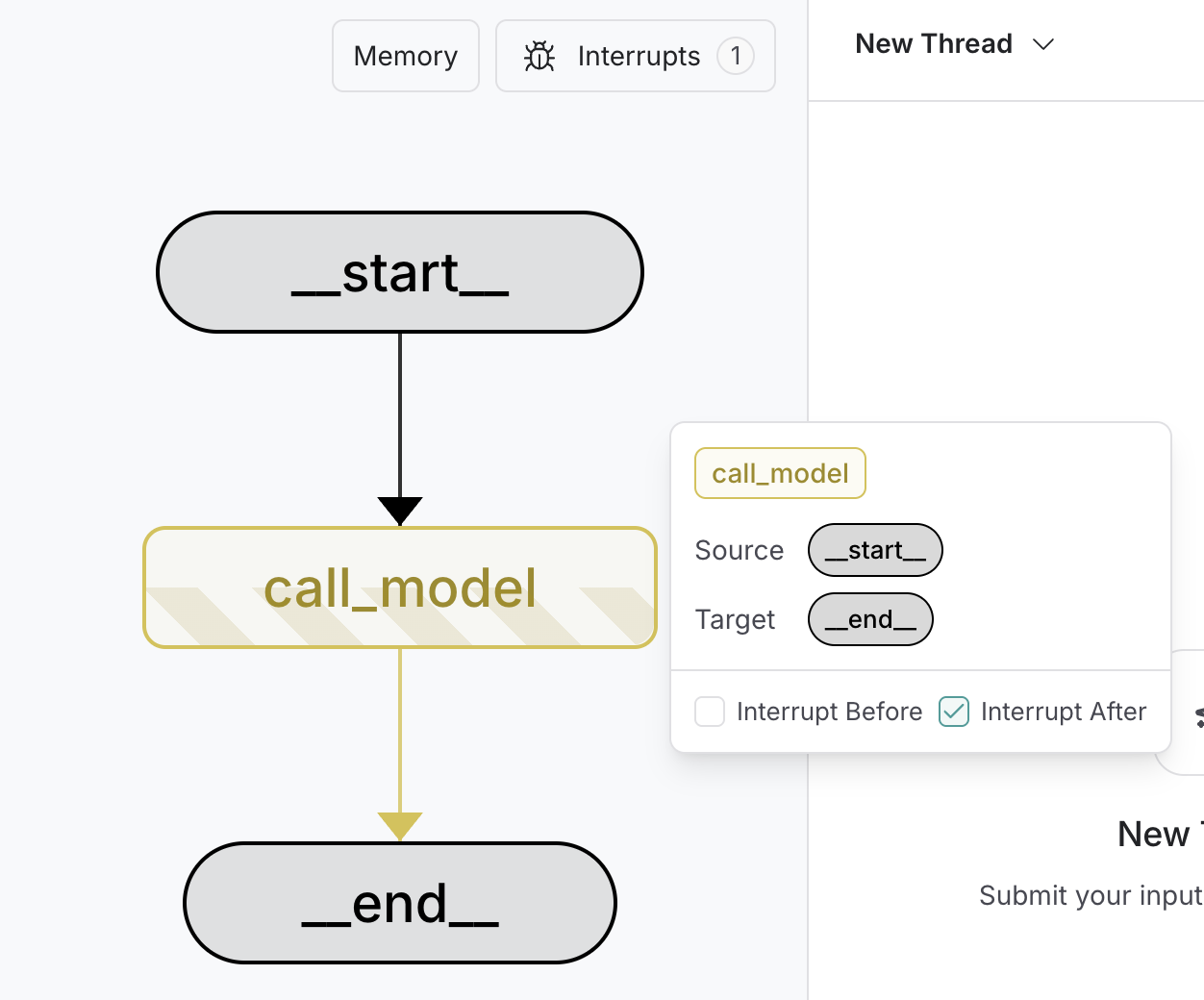
To debug and test a graph, you can use static interrupts as breakpoints to step through the graph execution one node at a time. Static interrupts are triggered at defined points either before or after a node executes. You can set these by specifying interrupt_before and interrupt_after when compiling the graph.
Static interrupts are **not** recommended for human-in-the-loop workflows. Use the @[`interrupt`] function instead.
At compile time
    :::python
    ```python
    graph = builder.compile(
        interrupt_before=["node_a"],  # [!code highlight]
        interrupt_after=["node_b", "node_c"],  # [!code highlight]
        checkpointer=checkpointer,
    )

    # Pass a thread ID to the graph
    config = {
        "configurable": {
            "thread_id": "some_thread"
        }
    }

    # Run the graph until the breakpoint
    graph.invoke(inputs, config=config)  # [!code highlight]

    # Resume the graph
    graph.invoke(None, config=config)  # [!code highlight]
    ```

    1. The breakpoints are set during `compile` time.
    2. `interrupt_before` specifies the nodes where execution should pause before the node is executed.
    3. `interrupt_after` specifies the nodes where execution should pause after the node is executed.
    4. A checkpointer is required to enable breakpoints.
    5. The graph is run until the first breakpoint is hit.
    6. The graph is resumed by passing in `None` for the input. This will run the graph until the next breakpoint is hit.
    :::
    :::js
    ```typescript
    const graph = builder.compile({
        interruptBefore: ["node_a"],  // [!code highlight]
        interruptAfter: ["node_b", "node_c"],  // [!code highlight]
        checkpointer,
    });

    // Pass a thread ID to the graph
    const config = {
        configurable: {
            thread_id: "some_thread"
        }
    };

    // Run the graph until the breakpoint
    await graph.invoke(inputs, config);# [!code highlight]

    await graph.invoke(null, config);  # [!code highlight]
    ```

    1. The breakpoints are set during `compile` time.
    2. `interruptBefore` specifies the nodes where execution should pause before the node is executed.
    3. `interruptAfter` specifies the nodes where execution should pause after the node is executed.
    4. A checkpointer is required to enable breakpoints.
    5. The graph is run until the first breakpoint is hit.
    6. The graph is resumed by passing in `null` for the input. This will run the graph until the next breakpoint is hit.
    :::
At run time
    :::python
    ```python
    config = {
        "configurable": {
            "thread_id": "some_thread"
        }
    }

    # Run the graph until the breakpoint
    graph.invoke(
        inputs,
        interrupt_before=["node_a"],  # [!code highlight]
        interrupt_after=["node_b", "node_c"],  # [!code highlight]
        config=config,
    )

    # Resume the graph
    graph.invoke(None, config=config)  # [!code highlight]
    ```

    1. `graph.invoke` is called with the `interrupt_before` and `interrupt_after` parameters. This is a run-time configuration and can be changed for every invocation.
    2. `interrupt_before` specifies the nodes where execution should pause before the node is executed.
    3. `interrupt_after` specifies the nodes where execution should pause after the node is executed.
    4. The graph is run until the first breakpoint is hit.
    5. The graph is resumed by passing in `None` for the input. This will run the graph until the next breakpoint is hit.
    :::
    :::js
    ```typescript
    // Run the graph until the breakpoint
    graph.invoke(inputs, {
        interruptBefore: ["node_a"],  // [!code highlight]
        interruptAfter: ["node_b", "node_c"],  // [!code highlight]
        configurable: {
            thread_id: "some_thread"
        }
    });

    // Resume the graph
    await graph.invoke(null, config);  // [!code highlight]
    ```

    1. `graph.invoke` is called with the `interruptBefore` and `interruptAfter` parameters. This is a run-time configuration and can be changed for every invocation.
    2. `interruptBefore` specifies the nodes where execution should pause before the node is executed.
    3. `interruptAfter` specifies the nodes where execution should pause after the node is executed.
    4. The graph is run until the first breakpoint is hit.
    5. The graph is resumed by passing in `null` for the input. This will run the graph until the next breakpoint is hit.
    :::
To debug your interrupts, use LangSmith.
Using LangSmith Studio
You can use LangSmith Studio to set static interrupts in your graph in the UI before running the graph. You can also use the UI to inspect the graph state at any point in the execution.