Use time-travel
Overview
LangGraph supports time travel through checkpoints (opens in a new tab):
- Replay: Retry from a prior checkpoint.
- Fork: Branch from a prior checkpoint with modified state to explore an alternative path.
Both work by resuming from a prior checkpoint. Nodes before the checkpoint are not re-executed (results are already saved). Nodes after the checkpoint re-execute, including any LLM calls, API requests, and interrupts (opens in a new tab) (which may produce different results).
Replay
Invoke the graph with a prior checkpoint's config to replay from that point.
Replay re-executes nodes—it doesn't just read from cache. LLM calls, API requests, and interrupts (opens in a new tab) fire again and may return different results. Replaying from the final checkpoint (no
nextnodes) is a no-op.
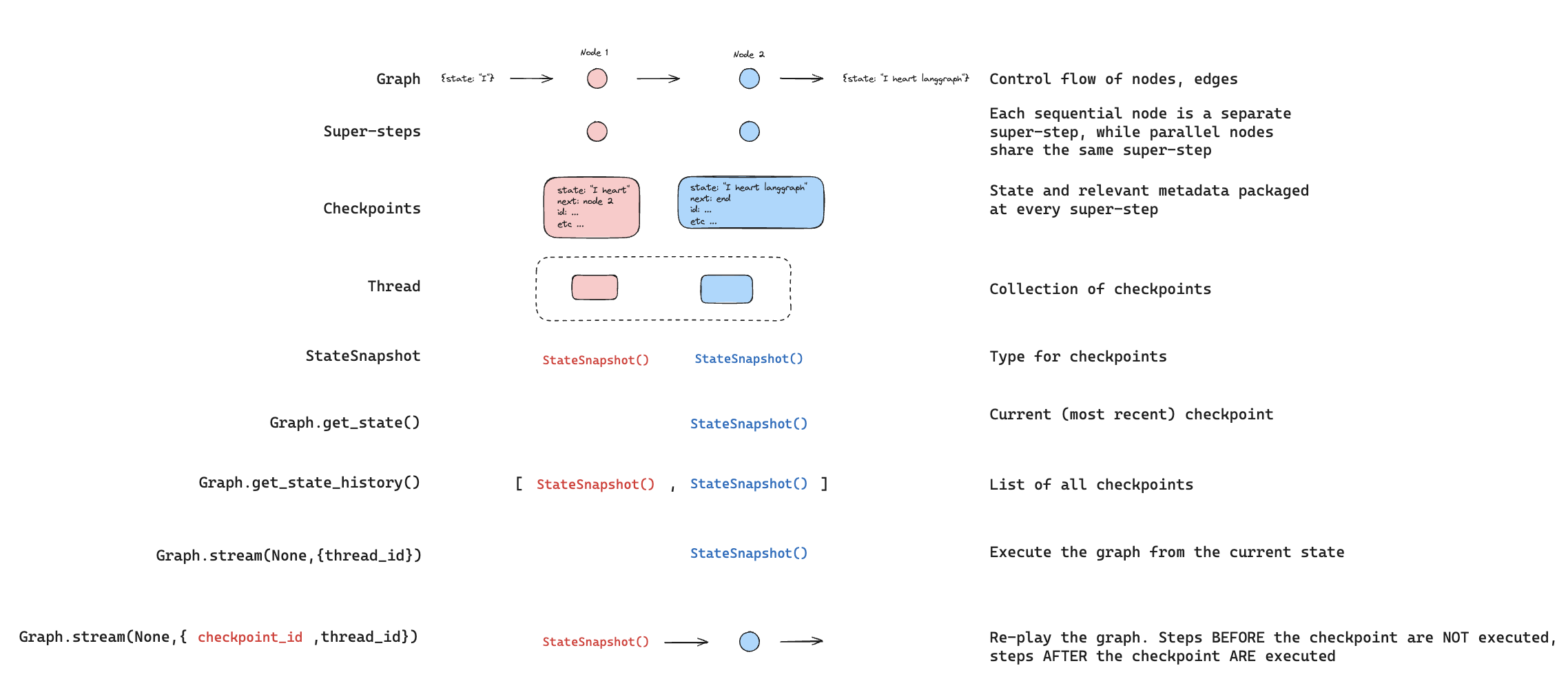
Use @[get_state_history] to find the checkpoint you want to replay from, then call @[invoke][CompiledStateGraph.invoke] with that checkpoint's config:
from langgraph.graph import StateGraph, START
from langgraph.checkpoint.memory import InMemorySaver
from typing_extensions import TypedDict, NotRequired
from langchain_core.utils.uuid import uuid7

class State(TypedDict):
    topic: NotRequired[str]
    joke: NotRequired[str]


def generate_topic(state: State):
    return {"topic": "socks in the dryer"}


def write_joke(state: State):
    return {"joke": f"Why do {state['topic']} disappear? They elope!"}


checkpointer = InMemorySaver()
graph = (
    StateGraph(State)
    .add_node("generate_topic", generate_topic)
    .add_node("write_joke", write_joke)
    .add_edge(START, "generate_topic")
    .add_edge("generate_topic", "write_joke")
    .compile(checkpointer=checkpointer)
)

# Step 1: Run the graph
config = {"configurable": {"thread_id": str(uuid7())}}
result = graph.invoke({}, config)

# Step 2: Find a checkpoint to replay from
history = list(graph.get_state_history(config))
# History is in reverse chronological order
for state in history:
    print(f"next={state.next}, checkpoint_id={state.config['configurable']['checkpoint_id']}")

# Step 3: Replay from a specific checkpoint
# Find the checkpoint before write_joke
before_joke = next(s for s in history if s.next == ("write_joke",))
replay_result = graph.invoke(None, before_joke.config)
# write_joke re-executes (runs again), generate_topic does not
Fork
Fork creates a new branch from a past checkpoint with modified state. Call @[update_state] on a prior checkpoint to create the fork, then @[invoke][CompiledStateGraph.invoke] with None to continue execution.
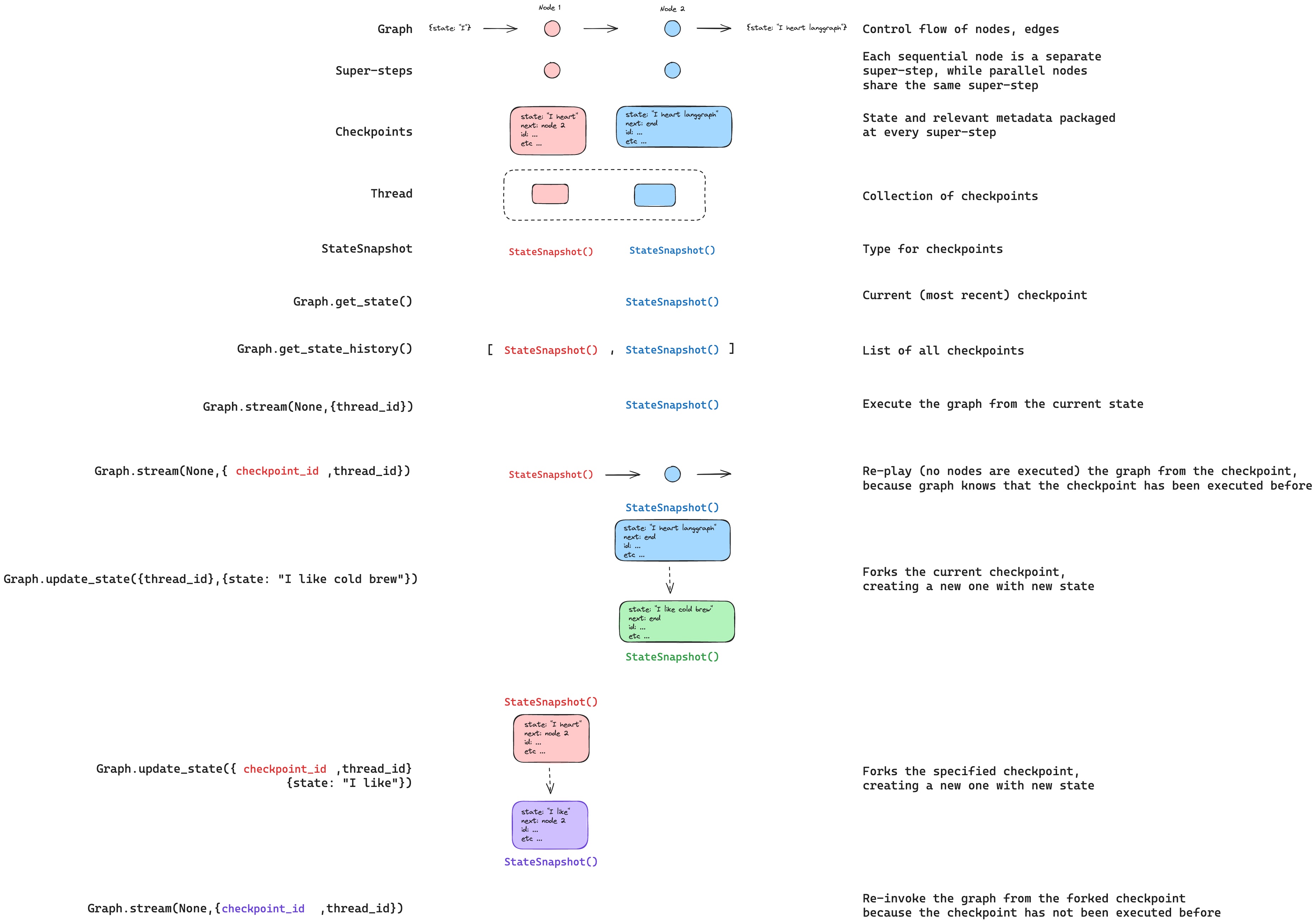
update_statedoes not roll back a thread. It creates a new checkpoint that branches from the specified point. The original execution history remains intact.
# Find checkpoint before write_joke
history = list(graph.get_state_history(config))
before_joke = next(s for s in history if s.next == ("write_joke",))

# Fork: update state to change the topic
fork_config = graph.update_state(
    before_joke.config,
    values={"topic": "chickens"},
)

# Resume from the fork — write_joke re-executes with the new topic
fork_result = graph.invoke(None, fork_config)
print(fork_result["joke"])  # A joke about chickens, not socks
From a specific node
When you call @[update_state], values are applied using the specified node's writers (including reducers (opens in a new tab)). The checkpoint records that node as having produced the update, and execution resumes from that node's successors.
By default, LangGraph infers as_node from the checkpoint's version history. When forking from a specific checkpoint, this inference is almost always correct.
Specify as_node explicitly when:
- Parallel branches: Multiple nodes updated state in the same step, and LangGraph can't determine which was last (
InvalidUpdateError). - No execution history: Setting up state on a fresh thread (common in testing (opens in a new tab)).
- Skipping nodes: Set
as_nodeto a later node to make the graph think that node already ran.
# graph: generate_topic -> write_joke

# Treat this update as if generate_topic produced it.
# Execution resumes at write_joke (the successor of generate_topic).
fork_config = graph.update_state(
    before_joke.config,
    values={"topic": "chickens"},
    as_node="generate_topic",
)
Interrupts
If your graph uses @[interrupt] for human-in-the-loop (opens in a new tab) workflows, interrupts are always re-triggered during time travel. The node containing the interrupt re-executes, and interrupt() pauses for a new Command(resume=...).
from langgraph.types import interrupt, Command

class State(TypedDict):
    value: list[str]

def ask_human(state: State):
    answer = interrupt("What is your name?")
    return {"value": [f"Hello, {answer}!"]}

def final_step(state: State):
    return {"value": ["Done"]}

graph = (
    StateGraph(State)
    .add_node("ask_human", ask_human)
    .add_node("final_step", final_step)
    .add_edge(START, "ask_human")
    .add_edge("ask_human", "final_step")
    .compile(checkpointer=InMemorySaver())
)

config = {"configurable": {"thread_id": "1"}}

# First run: hits interrupt
graph.invoke({"value": []}, config)
# Resume with answer
graph.invoke(Command(resume="Alice"), config)

# Replay from before ask_human
history = list(graph.get_state_history(config))
before_ask = [s for s in history if s.next == ("ask_human",)][-1]

replay_result = graph.invoke(None, before_ask.config)
# Pauses at interrupt — waiting for new Command(resume=...)

# Fork from before ask_human
fork_config = graph.update_state(before_ask.config, {"value": ["forked"]})
fork_result = graph.invoke(None, fork_config)
# Pauses at interrupt — waiting for new Command(resume=...)

# Resume the forked interrupt with a different answer
graph.invoke(Command(resume="Bob"), fork_config)
# Result: {"value": ["forked", "Hello, Bob!", "Done"]}
Multiple interrupts
If your graph collects input at several points (for example, a multi-step form), you can fork from between the interrupts to change a later answer without re-asking earlier questions.
def ask_name(state):
    name = interrupt("What is your name?")
    return {"value": [f"name:{name}"]}

def ask_age(state):
    age = interrupt("How old are you?")
    return {"value": [f"age:{age}"]}

# Graph: ask_name -> ask_age -> final
# After completing both interrupts:

# Fork from BETWEEN the two interrupts (after ask_name, before ask_age)
history = list(graph.get_state_history(config))
between = [s for s in history if s.next == ("ask_age",)][-1]

fork_config = graph.update_state(between.config, {"value": ["modified"]})
result = graph.invoke(None, fork_config)
# ask_name result preserved ("name:Alice")
# ask_age pauses at interrupt — waiting for new answer
Subgraphs
Time travel with subgraphs (opens in a new tab) depends on whether the subgraph has its own checkpointer. This determines the granularity of checkpoints you can time travel from.
Inherited checkpointer (default)
By default, a subgraph inherits the parent's checkpointer. The parent treats the entire subgraph as a single super-step — there is only one parent-level checkpoint for the whole subgraph execution. Time traveling from before the subgraph re-executes it from scratch.
You cannot time travel to a point between nodes in a default subgraph — you can only time travel from the parent level.
# Subgraph without its own checkpointer (default)
subgraph = (
    StateGraph(State)
    .add_node("step_a", step_a)       # Has interrupt()
    .add_node("step_b", step_b)       # Has interrupt()
    .add_edge(START, "step_a")
    .add_edge("step_a", "step_b")
    .compile()  # No checkpointer — inherits from parent
)

graph = (
    StateGraph(State)
    .add_node("subgraph_node", subgraph)
    .add_edge(START, "subgraph_node")
    .compile(checkpointer=InMemorySaver())
)

config = {"configurable": {"thread_id": "1"}}

# Complete both interrupts
graph.invoke({"value": []}, config)            # Hits step_a interrupt
graph.invoke(Command(resume="Alice"), config)  # Hits step_b interrupt
graph.invoke(Command(resume="30"), config)     # Completes

# Time travel from before the subgraph
history = list(graph.get_state_history(config))
before_sub = [s for s in history if s.next == ("subgraph_node",)][-1]

fork_config = graph.update_state(before_sub.config, {"value": ["forked"]})
result = graph.invoke(None, fork_config)
# The entire subgraph re-executes from scratch
# You cannot time travel to a point between step_a and step_b
Subgraph checkpointer
Set checkpointer=True on the subgraph to give it its own checkpoint history. This creates checkpoints at each step within the subgraph, allowing you to time travel from a specific point inside it — for example, between two interrupts.
Use @[get_state] with subgraphs=True to access the subgraph's own checkpoint config, then fork from it:
# Subgraph with its own checkpointer
subgraph = (
    StateGraph(State)
    .add_node("step_a", step_a)       # Has interrupt()
    .add_node("step_b", step_b)       # Has interrupt()
    .add_edge(START, "step_a")
    .add_edge("step_a", "step_b")
    .compile(checkpointer=True)  # Own checkpoint history
)

graph = (
    StateGraph(State)
    .add_node("subgraph_node", subgraph)
    .add_edge(START, "subgraph_node")
    .compile(checkpointer=InMemorySaver())
)

config = {"configurable": {"thread_id": "1"}}

# Run until step_a interrupt
graph.invoke({"value": []}, config)

# Resume step_a -> hits step_b interrupt
graph.invoke(Command(resume="Alice"), config)

# Get the subgraph's own checkpoint (between step_a and step_b)
parent_state = graph.get_state(config, subgraphs=True)
sub_config = parent_state.tasks[0].state.config

# Fork from the subgraph checkpoint
fork_config = graph.update_state(sub_config, {"value": ["forked"]})
result = graph.invoke(None, fork_config)
# step_b re-executes, step_a's result is preserved
See subgraph persistence (opens in a new tab) for more on configuring subgraph checkpointers.